




Trusted by enterprise security teams
PwC Trustwave Teachers Mutual Bank Swire Shipping Defense.com

What Our Dark Web Monitoring Service Covers

Our dark web monitoring service matches any term you choose, such as your CEO’s name, against leaked files, leak-site posts, hacker forums and Telegram channels.

With over 41 billion leaked credentials indexed, our dark web credential monitoring checks every credential against the domains and email addresses you monitor. New stealer logs posted to Telegram channels and criminal markets are indexed within hours.

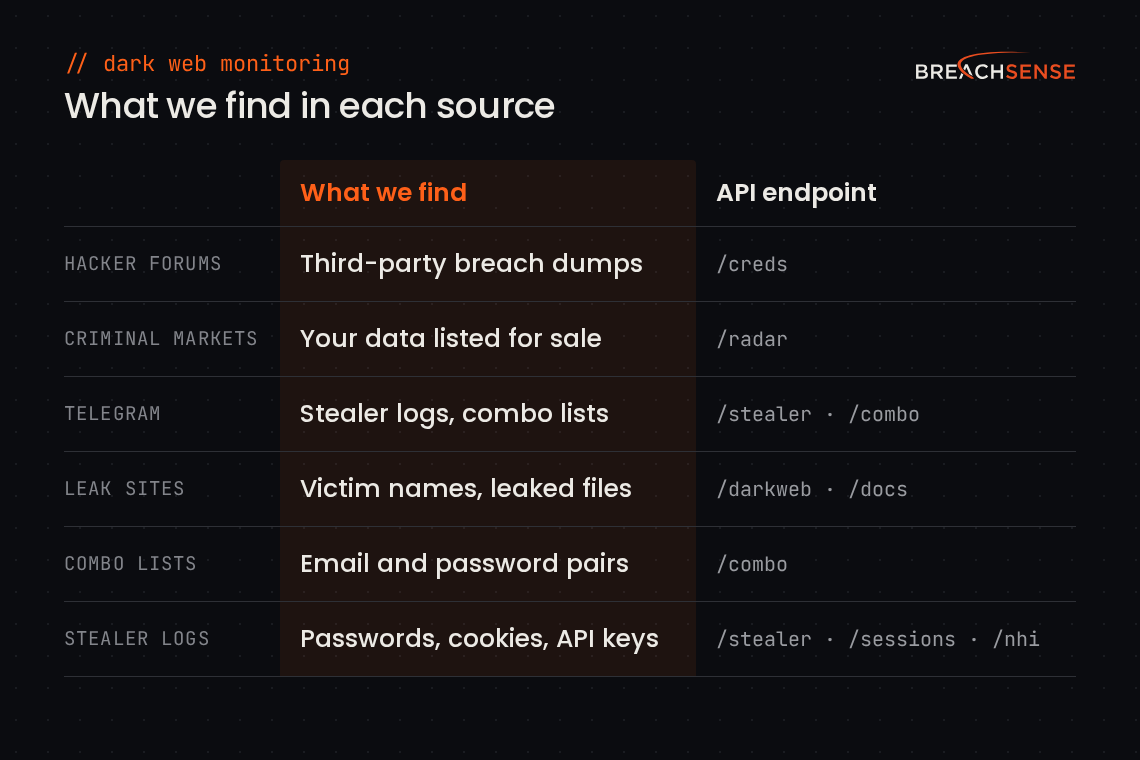
Table of the six sources Breachsense collects from and what we find in each, with the API endpoint that returns that data.

Where we collect leaked data

  • Hacker forums: deep and dark web monitoring of breach dumps.
  • Criminal markets: your company data listed for sale.
  • Telegram channels: our Telegram monitoring covers stealer logs.
  • Ransomware leak sites: victim posts from 100+ ransomware groups.
  • Combo lists: email and password pairs, usually in plaintext.
  • Stealer logs: passwords and cookies taken by infostealer malware.

What we find

  • Leaked credentials: we crack passwords stored in weak hash formats, so compromised credential monitoring alerts can show the plaintext.
  • Session tokens: we find session cookies in stealer logs, so your team knows which sessions to revoke.
  • API keys and OAuth tokens: service credentials from stealer logs and from files leaked in ransomware attacks.
  • Infected devices: some stealer log alerts include the device name and the malware family, such as StealC or Vidar.
  • Third-party breaches: your company’s data, leaked when a vendor or another site your staff use was breached.
  • Leaked company files: files leaked in ransomware attacks and third-party breaches, plus files from unsecured databases. When a term you monitor turns up in a file, the alert includes the file’s URL.

Dark Web Monitoring Software That Fits Your Stack

Our dark web monitoring software sends each finding to your team as a webhook or email alert. A webhook is a message our server posts to a URL you choose, so your tools receive the alert as JSON. Each alert names the source type, such as a stealer log or a combo list, and the date we found the record.

You can point the webhook at Splunk, Microsoft Sentinel or your SOAR (the tool that runs your response playbooks). Your SIEM (the system that collects your security logs) or SOAR can query the Dark Web API instead and get the same JSON. Your SOAR playbook can then reset the leaked password and revoke the user’s sessions. Breachsense is an API-first solution, so there’s nothing to install. You get a license key and example API queries.

Managed service providers (MSPs) on our dark web monitoring for MSPs plans send each client’s alerts to that client’s own webhook or email address. Your SIEM can route each alert type to its own queue, using the api field in each webhook alert.
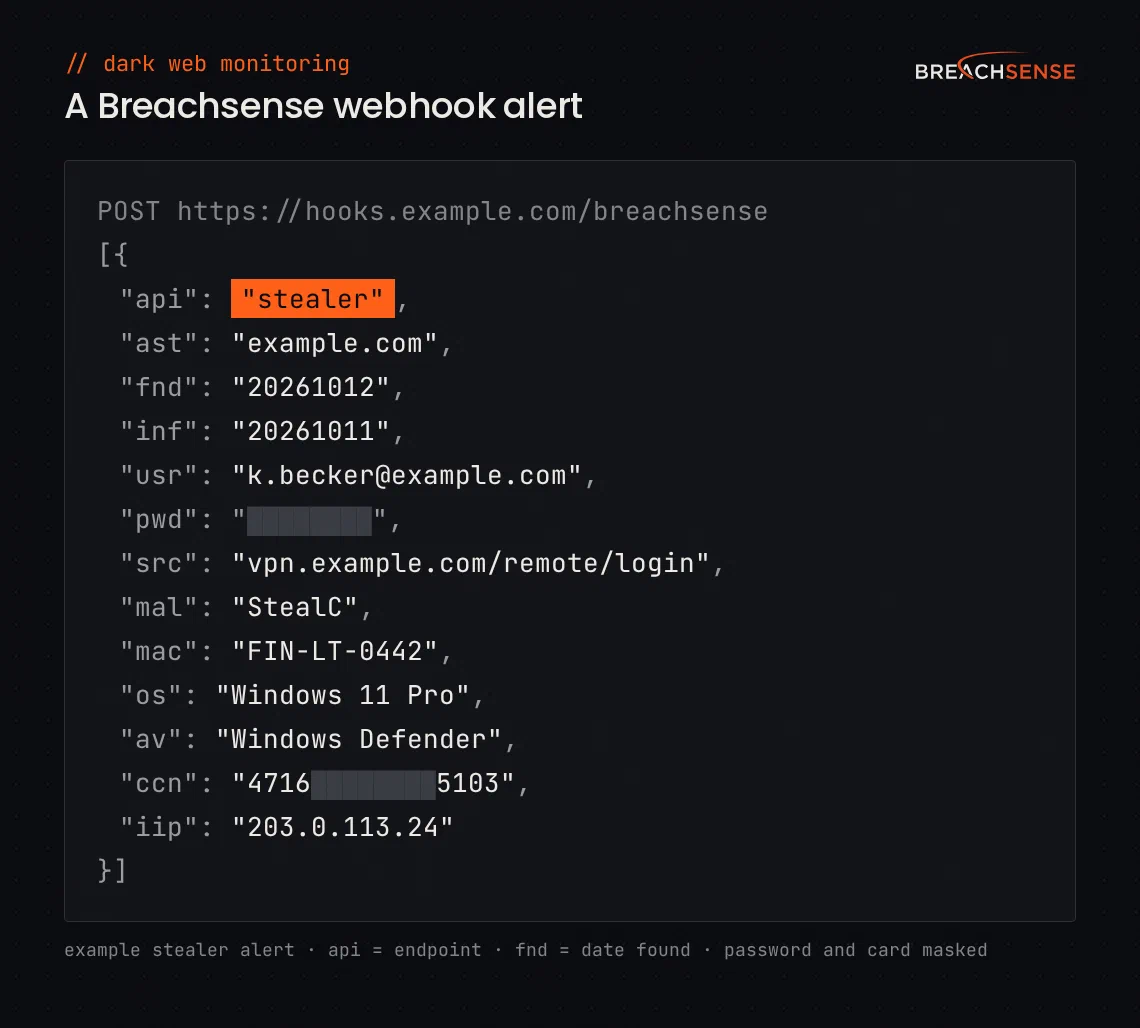
Example Breachsense webhook alert in JSON for a stealer log credential on example.com, showing the endpoint, the monitored asset, the dates found and infected, the username, a masked password, the login URL, the malware family, the machine name, the operating system, the antivirus, a masked card number and the infected device's IP address.

Who Uses Breachsense for Dark Web Monitoring?

Enterprise security operations centers (SOCs), managed security service providers (MSSPs), small in-house security teams and pen testers use Breachsense for dark web monitoring.

  • Enterprise SOC

    Fortune 500 security teams

    Monitor employee credentials and vendor exposure across your supply chain without flooding your SIEM with noise. Webhook alerts arrive with enough context that Tier 1 can act without escalating.

    What they use:
    Session token detectionhacker forum coverageSIEM webhooks
  • MSSP / MSP

    Service providers managing multiple clients

    Deliver dark web monitoring across your client base with per-client webhook routing. Show prospects their own leaked credentials live on a sales call.

    What they use:
    per-client webhook routinglive credential lookupsMSP plans
  • Mid-Market Security

    In-house SecOps with a small team

    Get exposure alerts within hours of a leak surfacing. Continuous credential and infostealer log coverage without staffing a 24/7 SOC.

    What they use:
    Credential monitoringinfostealer logsemail + webhook alerts
  • Pen Test / Red Team

    Offensive security firms

    Query the API on demand for leaked credentials on in-scope target domains. Responses include plaintext passwords when they're available.

    What they use:
    API accessinfostealer log searchstealer log data

How Our Dark Web Monitoring Platform Works

Add Domains & Employee Emails

Add your company domains, plus the personal email addresses of the executives you want covered.

We Scan the Dark Web

We crawl our sources continuously and match new records to the domains and emails you added.

Get Webhook or Email Alerts

Each match goes to the webhook or email address you set for that domain, or to your default address.

Reset Credentials Before Use

Your team resets the password and revokes the user’s sessions.

How to Choose a Dark Web Monitoring Service

Choose a dark web monitoring service that collects its own data and shows the source type and first-seen date for each record. Run each of the dark web monitoring tools we compared through a demo before you commit.

  • Does the vendor collect its data or license it? Ask which sources they collect directly versus license from a third party. Licensed feeds add latency because the vendor only sees what the upstream source decided to publish, when they decided to publish it.
  • Does each record show its source and first-seen date? Compare the first-seen dates two vendors give for the same leaked credential. Coverage claims that sound identical in marketing often differ by days or weeks in practice.
  • Will the vendor search your domain, or a client’s, live in the demo? Ask the vendor to run a live search on your domain or a client’s during the demo, not a canned example. Check whether each leaked password appears in plaintext or only as a password hash.
  • Does the vendor have an API that separates alerts by client? Ask for a sample webhook alert and check that your SIEM can parse it. If you’re an MSSP, also ask whether each client’s alerts can go to that client’s own webhook.

Breachsense publishes its collection methodology so buyers can compare apples to apples.

Frequently Asked Questions

Dark web monitoring is a service that alerts you when staff passwords or session tokens leak in stealer logs or on hacker forums. Your team then resets the leaked password or revokes the stolen session. Our guide to what dark web monitoring is also covers setup and what to ask a vendor.
Yes. Dark web monitoring services are worth it for any business whose staff sign in to company accounts. Among the ransomware victims in Verizon’s 2026 Data Breach Investigations Report, small organizations had a median of seven credential leak events in a year, and larger organizations around 20. Our article on whether dark web monitoring is worth it covers cost and limitations.
Your SIEM (security log system) and EDR (endpoint detection and response) tools monitor activity on your own systems. Dark web monitoring covers what’s posted about you on sites you don’t control. Your SIEM only logs a leaked credential once someone signs in with it. Dark web monitoring alerts you to that credential when it surfaces, so you can reset the password even if nobody has used the password yet. It lives upstream of your other security controls.
Alerts are sent as a JSON via webhook requests to your SIEM or SOAR, or as an HTML email to your security team. Credential alerts name the affected user, the type of credential or token and the date we found the leaked credential. They also name the source, such as a stealer log or combo list. Some credential alerts also include the malware family or the breach name. The Dark Web API lets you send each monitored domain’s alerts to its own webhook or email address.
Infostealer logs are indexed within hours of the file appearing on Telegram channels or criminal markets. Combo lists are indexed as they’re posted. Third-party breach dumps appear as they become available, which depends on when the source publishes them.
Whitelist the username and old password through our API, and we stop sending alerts for that credential. If a new password leaks for that account, we still alert on it. To stop all credential alerts for an account, such as a test account, whitelist the username on its own.
Most customers integrate in a couple of hours. Our Claude skill loads all 11 API endpoints, so Claude can write the code that sends our alerts into your SIEM or SOAR. Adding continuous monitoring for a domain or email address takes one API call.
Dark web monitoring helps prevent account takeover, where an attacker signs in with a leaked password from a combo list or stealer log. Dark web monitoring also helps prevent session hijacking, where stolen cookies let attackers skip the login process entirely. When we alert on a leaked password or cookie, you can reset the password and terminate the stolen session.
Reset the affected credential first, then revoke any active sessions tied to that account. Check your authentication logs for unauthorized access during the window the credential could have been used. Infostealer malware takes every password saved in the browser. If the alert came from a stealer log, have the employee change the work password on any account where they reused a personal password.
Both. Alerts match the domains and email addresses you monitor. Add an employee’s personal email address, such as an executive’s, to get alerts when it shows up in leaked data. We also index credentials leaked under personal email addresses, so a Dark Web API query returns them for any address.
Run our dark web scan on your corporate domain. You’ll see a summary of your company’s leaked credentials across stealer logs, combo lists, phishing kits and third-party breaches. The scan is a one-time snapshot. For ongoing coverage with detailed webhook or email alerts as new leaks appear, book a demo.

Start Dark Web Monitoring for Your Business

Book a demo