Trusted by enterprise security teams
PwC Trustwave Teachers Mutual Bank Swire Shipping Defense.com

Set It Up in Two Minutes

1. Save your license key once.

mkdir -p ~/.config/breachsense
echo 'your-license-key' > ~/.config/breachsense/license.md
chmod 600 ~/.config/breachsense/license.md

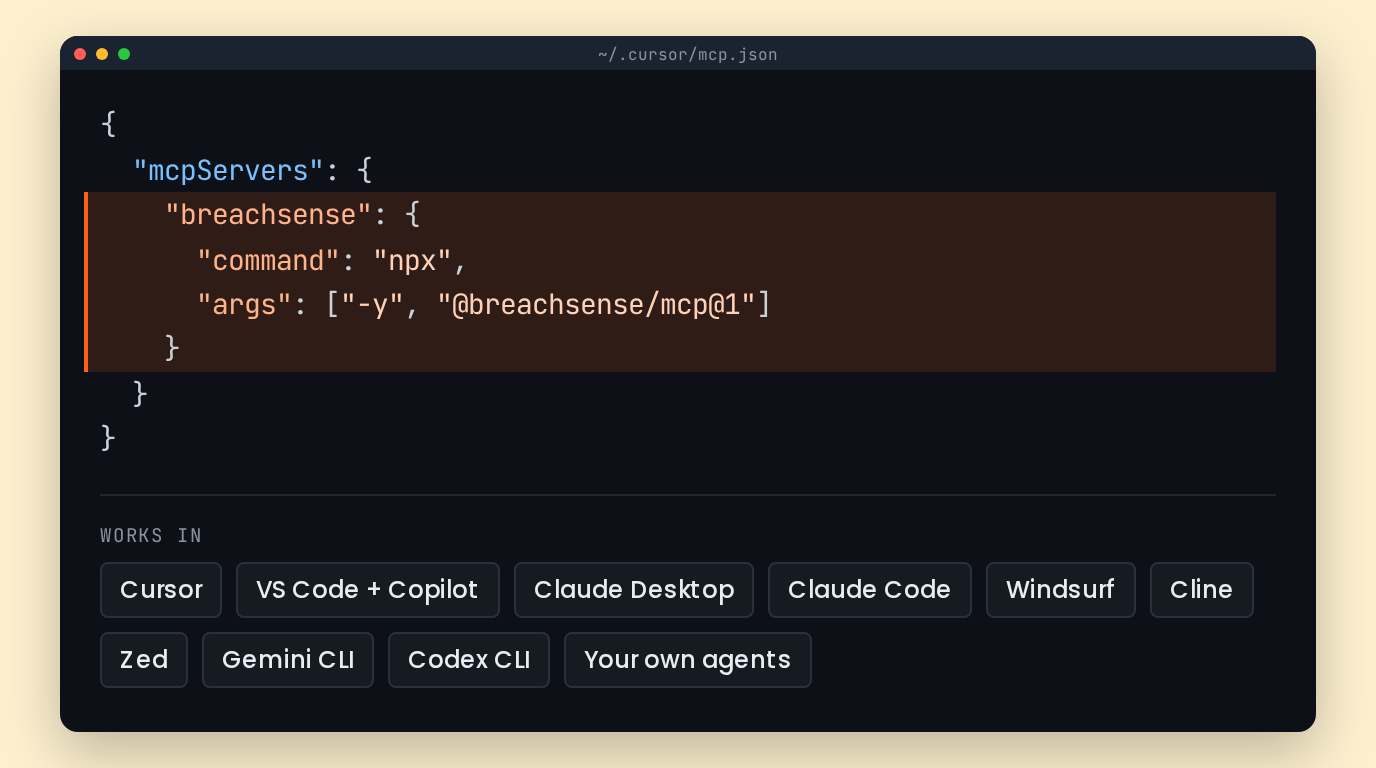
2. Add Breachsense to your AI tool. For most, it’s one entry in the MCP config:

"breachsense": { "command": "npx", "args": ["-y", "@breachsense/mcp@1"] }

3. Restart your AI tool and start with a free query, such as “How many Breachsense queries do I have left?”

The server needs Node.js 20 or newer. Our setup guide on GitHub has the full config for each tool.

api.breachsense.com GET /stealer
$curl -H "lic: $BS_LIC" \
    "https://api.breachsense.com/stealer?s=example.com"
HTTP/1.1 206 Partial Content  ·  4.2s  ·  application/json
{
  "results": [
    { "usr": "k.becker@example.com", "pwd": "V••••••12", "mal": "StealC", "src": "confluence.example.com", "fnd": "20261126" },
    { "usr": "t.nilsson@example.com", "pwd": "U••••••91", "mal": "Vidar", "ccn": "5188••••••••2470", "fnd": "20261126" },
    { "usr": "legal@example.com", "pwd": "C••••••53", "mal": "StealC", "src": "salesforce.example.com", "fnd": "20261125" },
    { "usr": "m.ahmadi@example.com", "pwd": "G••••••48", "mal": "Vidar", "cwa": "0xBe3a17…cD8f49A", "fnd": "20261125" },
    { "usr": "ops@example.com", "pwd": "F••••••76", "mal": "StealC", "ccn": "4716••••••••5103", "fnd": "20261124" },
    { "usr": "n.silva@example.com", "pwd": "B••••••29", "mal": "Vidar", "src": "gitlab.example.com", "fnd": "20261123" },
    { "usr": "finance@example.com", "pwd": "Y••••••84", "mal": "StealC", "src": "sso.example.com", "fnd": "20261122" },
    { "usr": "l.weber@example.com", "pwd": "N••••••62", "mal": "Vidar", "cwa": "0x9aB42c…6f81E2A", "fnd": "20261121" },
    { "usr": "a.osei@example.com", "pwd": "P••••••38", "mal": "StealC", "src": "jenkins.example.com", "fnd": "20261120" },
    { "usr": "hr@example.com", "pwd": "R••••••15", "mal": "Vidar", "ccn": "5247••••••••8842", "fnd": "20261119" },
    { "usr": "d.chen@example.com", "pwd": "K••••••07", "mal": "StealC", "src": "vpn.example.com", "fnd": "20261118" }
  ],
  "more": "850 more records · paginate via p=2"
}


Why Use Breachsense Through MCP?

One Setup Across Your AI Tools

The same server runs in Cursor, VS Code, Claude Desktop and Gemini CLI. It works with whichever model you pick, such as GPT, Gemini or Claude.

Ask in Plain English

Ask your question the way you’d ask a colleague. Your assistant runs the search and tells you what it found.

Build Breachsense Into Your Own Agents

Platform vendors and MSSPs (managed security service providers) can add Breachsense searches to their own AI agents.

What Can You Ask Breachsense From Your AI Tool?

Before each search, your assistant tells you what it’s going to look up.

  • “Show me stealer logs for example.com from the last 30 days.”
  • “Check example.com for leaked credentials across all sources.”
  • “Any leaked session cookies for example.com?”
  • “Find leaked API keys associated with example.com.”
  • “Has example.com shown up on a ransomware leak site?”
  • “Search leaked files for example.com email addresses.”
  • “Add example.com to my watchlist and send alerts to security@example.com.”

When you ask for leaked credentials across all sources, your assistant checks every credential source we index. Those are stealer logs, combo lists, phishing kits and third-party breaches, including unsecured databases. Leaked files and ransomware leak sites have their own searches. After each answer, your assistant suggests one next step, such as checking the same domain for leaked session cookies.

Which AI Tools Work With the Breachsense MCP Server?

Any tool that can start a local MCP server works. Our setup guide has the exact config for each one.

AI toolWhere to add the server
Claude CodeInstall the Breachsense plugin (commands below)
Claude DesktopOpen breachsense.mcpb from our latest release for a one-click install
Cursor~/.cursor/mcp.json, or .cursor/mcp.json in one project
VS Code with GitHub Copilot.vscode/mcp.json, or MCP: Open User Configuration for every workspace
Windsurf~/.codeium/windsurf/mcp_config.json
Clinecline_mcp_settings.json, from the MCP Servers panel
ZedZed’s settings.json, under context_servers
OpenAI Codex CLI~/.codex/config.toml
Gemini CLI~/.gemini/settings.json
Google Antigravity and other MCP clientsStart npx -y @breachsense/mcp@1 as a stdio server
Your own agentsAdd it as a stdio server in the OpenAI Agents SDK or the Claude Agent SDK

The Claude Code plugin bundles the server with our Claude Code skill. Install it with two commands:

/plugin marketplace add https://github.com/breachsense/breachsense-plugins
/plugin install breachsense@breachsense

How Many Queries Does the MCP Server Use?

The MCP server uses your existing Breachsense query allowance. You don’t pay extra for the server itself.

  • Each page of search results costs one query.
  • Checking one domain across all four credential sources costs four queries.
  • Asking how many results a search has is free.
  • Searches for example.com and test.com are free too, for testing your setup.
  • Checking your usage, watchlist and alert settings is free.

Your assistant tells you how many queries each answer used. It asks you before it fetches another page of results.

What Should Your Security Team Check Before Approving the MCP Server?

The server runs on your own machine. Its code is open source under the MIT license, on GitHub.

  • Your AI provider never sees your license key. The server reads the key from your home folder or an environment variable. It sends the key only to api.breachsense.com. It also removes the key from everything it returns to your AI tool.
  • Leaked text is handled as data, not instructions. Leaked files can contain prompt injection. The server labels every search result as breach data and tells your assistant never to follow instructions inside the results.
  • You approve every change. Before your assistant edits your watchlist or alert settings, it states the exact change and asks you to confirm.
  • Each release is signed. GitHub Actions builds each release from our public repository. Releases go to npm with signed provenance, so npm audit signatures can verify the package.
  • Each release ships an SBOM. The CycloneDX SBOM (software bill of materials) lists every library bundled into the server.
  • You can pin the version. @breachsense/mcp@1 gets fixes but never a new major version. For locked-down environments, pin an exact release, such as @breachsense/mcp@1.0.0.

Frequently Asked Questions

The MCP server connects your AI tool to the Breachsense API through MCP (Model Context Protocol). Your assistant gets Breachsense tools, such as stealer log search and leaked file search. You ask in plain English. Your assistant chooses which search to run.
Yes. The server itself is free. Every search goes to the Breachsense API, which needs a license key. If you don’t have a license yet, book a demo. A trial is available after a demo call.
The skill teaches Claude Code, Codex and GitHub Copilot how to call our API. The MCP server works in any AI tool that supports MCP, including Cursor, Windsurf and Gemini CLI. In Codex and VS Code with Copilot, you can use either one.
Not yet. ChatGPT and claude.ai only connect to MCP servers hosted online. Ours runs on your computer. Use Claude Desktop, Claude Code or one of the other tools on this page instead.
Yes. Save the key in ~/.config/breachsense/license.md and leave it out of the config. The file sits in your home folder, never inside a project, so it can’t end up in a repository. You can also set the BREACHSENSE_API_KEY environment variable. Claude Desktop stores the key in your system keychain.
Yes. Our setup guide on GitHub has code for the OpenAI Agents SDK and the Claude Agent SDK. Any other MCP client can start the server the same way. Your agent then gets the same Breachsense searches as Cursor or Claude Desktop.
No. By default, npx fetches the server when your AI tool starts it. To skip that download, install it once with npm i -g @breachsense/mcp@1. Then use breachsense-mcp as the command in your AI tool’s config.

Related Resources

Dark Web API

The REST API behind the MCP server. Call it from your own scripts or your SIEM.

Learn More

Breachsense for Claude Code

The Breachsense plugin for Claude Code installs the MCP server and the Claude Code skill together.

Learn More

Breachsense for Codex

Install the Breachsense skill in OpenAI Codex.

Learn More

Breachsense for GitHub Copilot

Install the Breachsense skill in GitHub Copilot.

Learn More

API Workflows and Use Cases

Example API workflows, such as finding a domain’s leaked credentials.

Learn More

Documentation

Every endpoint’s parameters and response fields, for when you call the API directly.

Learn More

Want to Try It? Book a Demo and We’ll Send You a Trial Key

Book a demo