Credential leak monitoring finds exposed employee passwords before attackers exploit them. Breachsense indexes credentials from stealer logs and cracks hashed passwords to plaintext. We also index leaked files from ransomware attacks so you can run full-text searches across all content. Search for your company name, employee names, or domain to find credentials in vendor breach dumps.
How Credentials Get Leaked:
• Infostealer Malware: Malware like LummaC2 and RedLine infects employee devices and harvests saved passwords from browsers. We index these stealer logs within hours of exposure.
• Third-Party Breaches: When vendors get breached, your data ends up in the dump. Search leaked files for credentials linked to your organization.
• Ransomware Attacks: Attackers breach vendors and publish stolen data on leak sites. Our full-text search finds your company’s credentials in these files.
• Phishing Attacks: Credential harvesting campaigns trick employees into entering passwords on fake login pages.
Leaked vs Compromised Credentials:
Leaked credentials are exposed but not yet exploited. Compromised credentials are already being used by attackers. The difference is time. By detecting credentials when they’re leaked, you can reset them before they become compromised.
Credential Leak Monitoring
Detect Leaked Credentials Before Attackers Use Them
Breachsense is a credential leak monitoring platform that detects stolen passwords and session tokens across stealer logs and dark web markets. Your employees’ passwords are leaking right now. Infostealers harvest them from infected devices. Vendor breaches expose them in ransomware dumps. Reset compromised credentials before they’re exploited.
Book a demo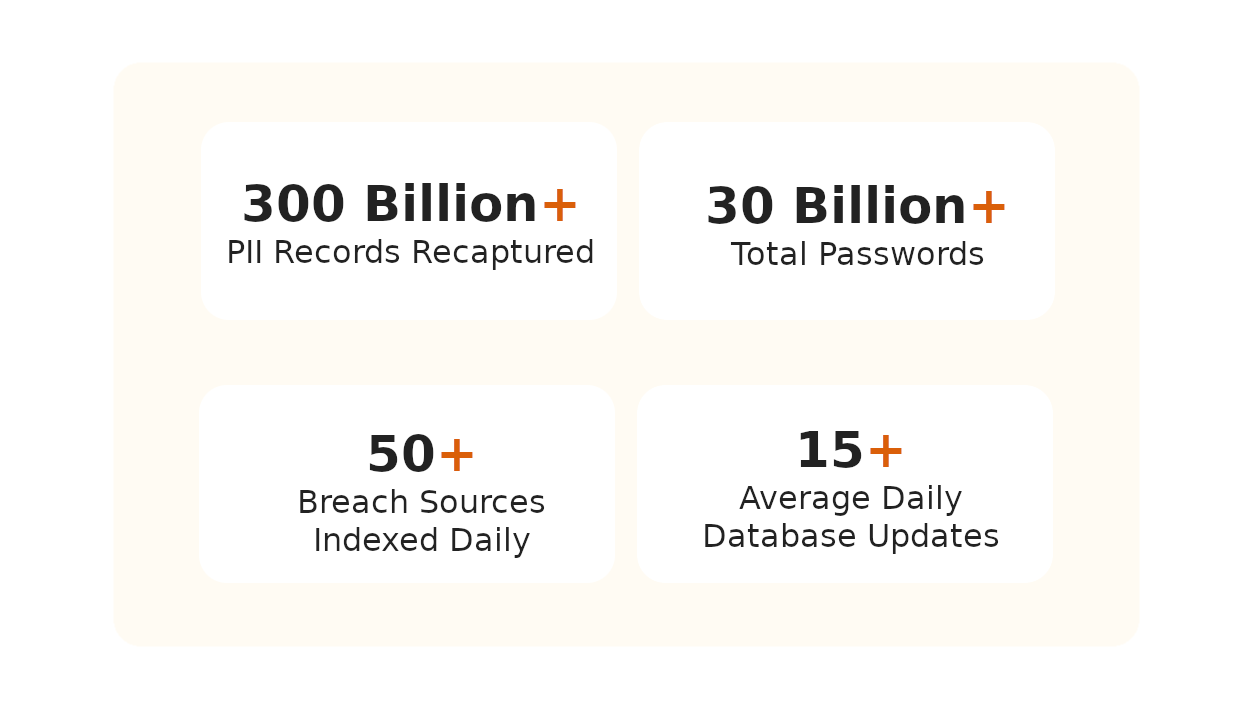





What is Credential Leak Monitoring?
Why Monitor for Leaked Credentials?
Full-Text Search on Leaked Files
When vendors get hit by ransomware, your credentials end up in the dump. Search across millions of leaked documents from ransomware attacks for employee usernames and passwords. Know exactly what was exposed.
Credentials From Stealer Logs
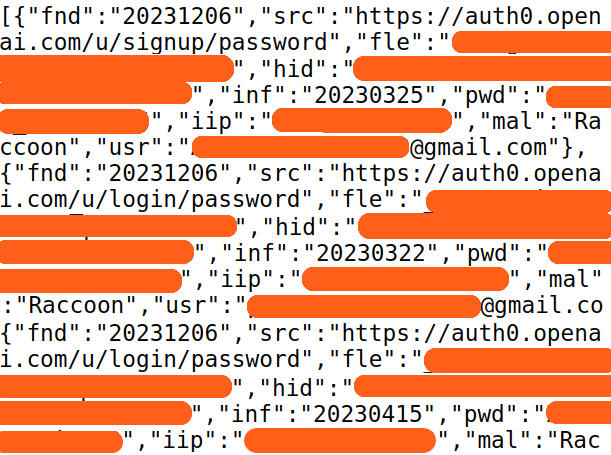
We index credentials from infostealer channels within hours of exposure. Crack hashed passwords to plaintext. Find an infected employee? Pivot on their username to see every service they logged into.
API-First for Security Teams
Search leaked files and query credentials via API. Push alerts to your SIEM or SOAR. Trigger automated password resets. Built for integration, not dashboard watching.
Credential Monitoring Platform Trusted by Security Teams Worldwide
Our team uses Breachsense data to gain initial access during pen testing and red team engagements. The API is simple to use and the support is always helpful and responds quickly.
Gordon Maddern
Technical Director, Red Cursor

Our Security Colony platform relies on Breachsense data as part of our dark web monitoring service. The data is continuously updated and high quality. Highly recommend!
Nick Ellsmore
SVP Professional Services, Trustwave

We rely on Breachsense for a lot of data. Their frequent database updates, constant availability, and handling of big and small breaches alike means we are always covered.
Bill Mathews
CTO, Hurricane Labs

How Does Breachsense Detect Leaked Credentials?
Add Your Domains & Assets
We Scan Stealer Logs & Breaches
Get Credential Alerts
Reset Passwords Fast
Frequently Asked Questions
Compromised credentials are login details like usernames and passwords that have been exposed or stolen. This includes session tokens and other authentication data. Attackers use these credentials to gain unauthorized access to accounts. According to Verizon’s 2025 Data Breach Investigations Report, 88% of web application breaches involved stolen or brute-forced credentials. They’re frequently the initial access vector for data breaches.
Credentials leak through multiple channels. Infostealer malware infects devices and harvests saved browser passwords. Third-party breaches expose credentials when vendors get hacked. Credential harvesting through phishing tricks users into entering passwords on fake sites. Once leaked, credentials end up in stealer logs and dark web marketplaces.
Leaked credentials are exposed but not necessarily being used by attackers yet. Compromised credentials are actively being exploited. Think of it as a timeline: credentials get leaked first, then attackers find and use them. Credential leak monitoring catches them early in this timeline so you can reset passwords before attackers act.
Attackers can exploit stolen credentials within hours of a breach. Automated tools test thousands of username and password pairs across multiple sites in minutes through credential stuffing attacks. Credentials from infostealer malware are especially dangerous because they include active session tokens that can bypass multi-factor authentication. The faster you detect and reset leaked credentials, the less time attackers have to use them.
Act fast. Reset the exposed passwords immediately and terminate any active sessions for affected accounts. Check for signs of unauthorized access. If the credentials were harvested by infostealer malware, the infected device needs to be isolated and remediated. Finally, notify affected users and enforce a password change.
Breachsense continuously monitors dark web sources for your organization’s leaked credentials. We cover stealer log channels on Telegram and criminal marketplaces. We also index third-party breach data and crack hashed passwords to plaintext. For a full breakdown of the sources we track, see our dark web monitoring methodology. When your data shows up, Breachsense sends an alert so your team can act before attackers do.
Credential Security Resources
Guides for credential security and attack prevention
Dark Web Monitoring
Track criminal marketplaces and hacker forums where stolen credentials are sold. Detect leaked passwords before they’re used to breach your systems.
Learn MoreLeaked Credentials Detection
Learn how to detect leaked credentials across dark web sources and stealer logs before they’re used against you.
Learn MoreCheck If Employee Credentials Are Compromised
Step-by-step guide to checking if your employees’ credentials have been exposed in data breaches or infostealer logs.
Learn MoreWhat Are Compromised Credentials?
Understand how credentials become compromised and the difference between leaked and actively exploited credentials.
Learn MoreCredential Stuffing Attacks
Learn how attackers use leaked credentials in automated credential stuffing attacks. Understand the attack methodology and how to defend against it.
Learn MoreCredential Monitoring Alternatives
Compare approaches to credential monitoring and exposure detection. See how different tools handle passwords and session tokens.
Learn MorePassword Breach Guide
Full guide to understanding password breaches. Learn how passwords get compromised and what to do when your credentials are exposed.
Learn MoreMalware Incident Response
How to respond when infostealer malware compromises employee devices and harvests credentials.
Learn More