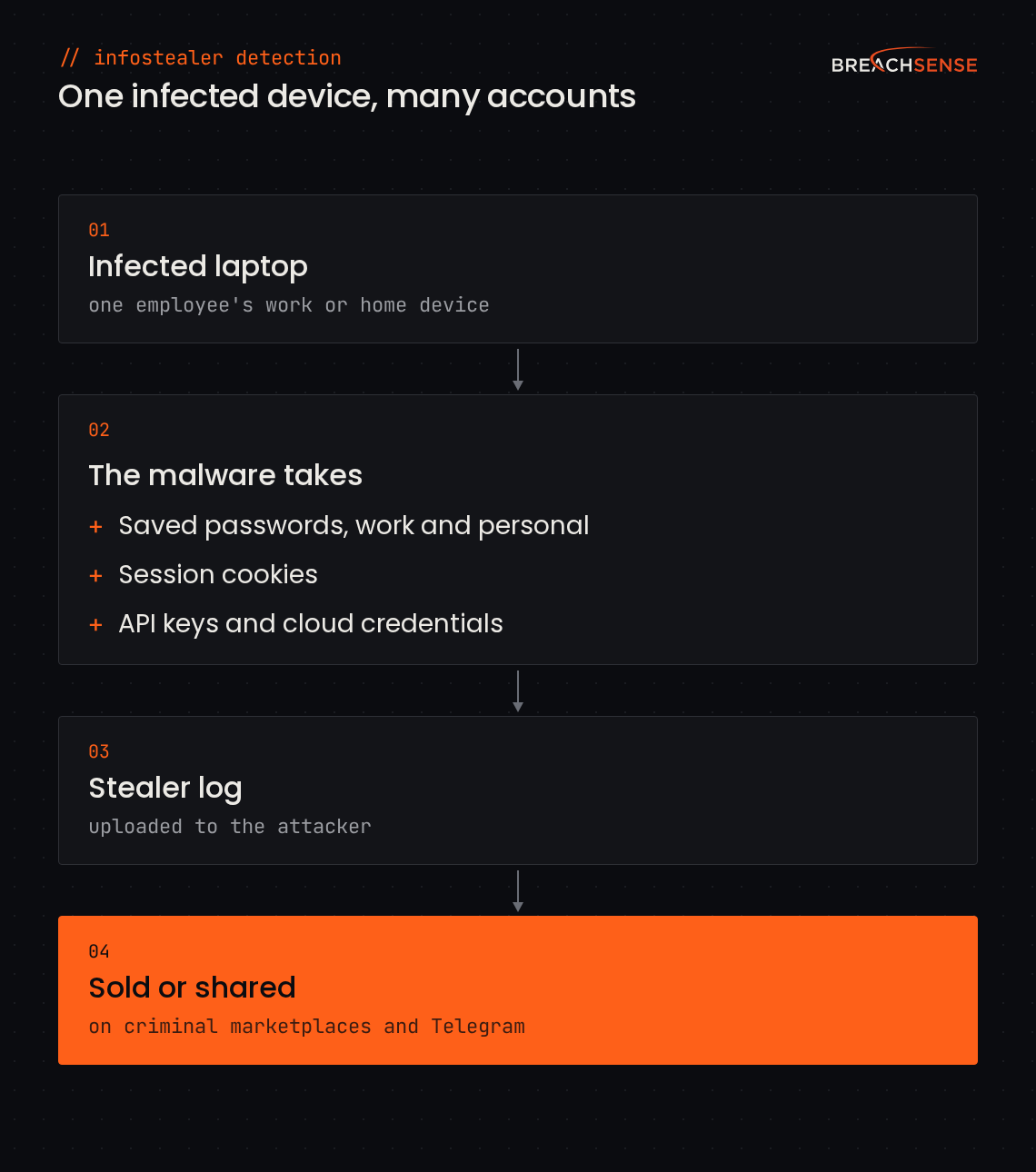
An infostealer takes every password saved in the infected device’s browser, work and personal. It also takes session cookies, the tokens a site uses to keep someone signed in. While a session is still active, a stolen cookie lets an attacker bypass the password and MFA (multi-factor authentication) requirements. Some logs also include API keys and cloud credentials stored on the machine.
The malware packs the passwords, cookies and API keys into a stealer log and uploads the log to the attacker. Attackers sell or share stealer logs on criminal marketplaces and Telegram channels. So one infected laptop can expose an employee’s work email, VPN and single sign-on accounts at once, plus personal accounts that share a password with work.
The 2026 Verizon Data Breach Investigations Report looked at ransomware victims. 73% had a credential or infostealer leak in the year before the attack. For half of those victims, the leak came within 95 days of the attack.
Infostealer Detection for Your Company Domains
Monitor leaked credentials, stealer logs and session tokens for your corporate domains
Infostealer malware takes every password and session cookie saved in an infected browser. Some stealer logs also include API keys. Breachsense indexes new stealer logs within hours. We send you an alert by webhook or email when your domains or monitored session cookies show up. The alert includes the plaintext password, the stolen cookie or the leaked API key.
Book a demo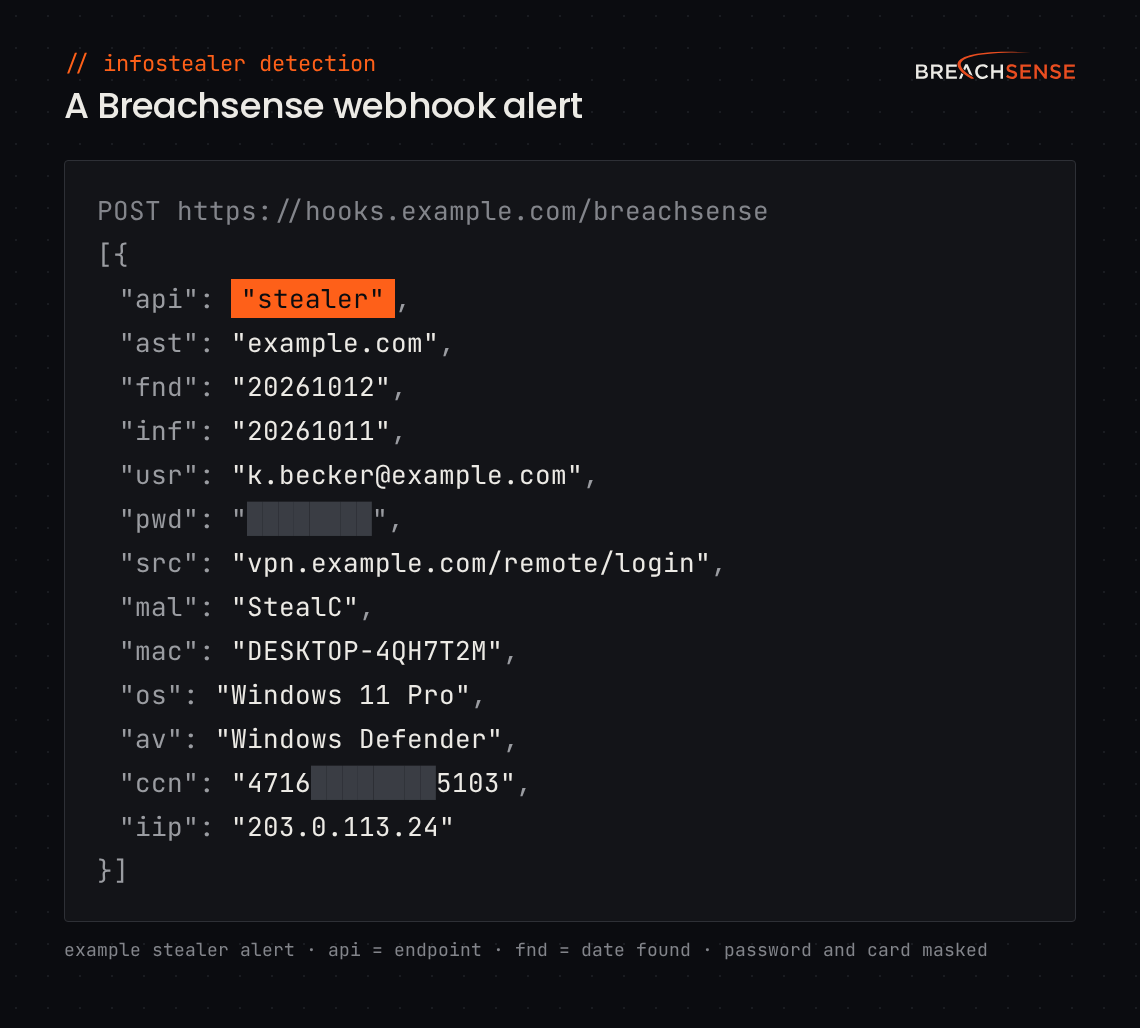
How Much Leaked Data We Index
We publish what each month’s stealer logs contained in our monthly infostealer reports. Our research is cited by the Center for Internet Security, Kaspersky ICS CERT and TechTarget.
42B+
leaked credentials indexed
1.8B+
credentials from stealer logs indexed
6.3B+
stolen browser cookies indexed
Why One Infected Device Exposes So Many Accounts
What Breachsense Pulls Out of Stealer Logs
Plaintext Credentials and Login URLs
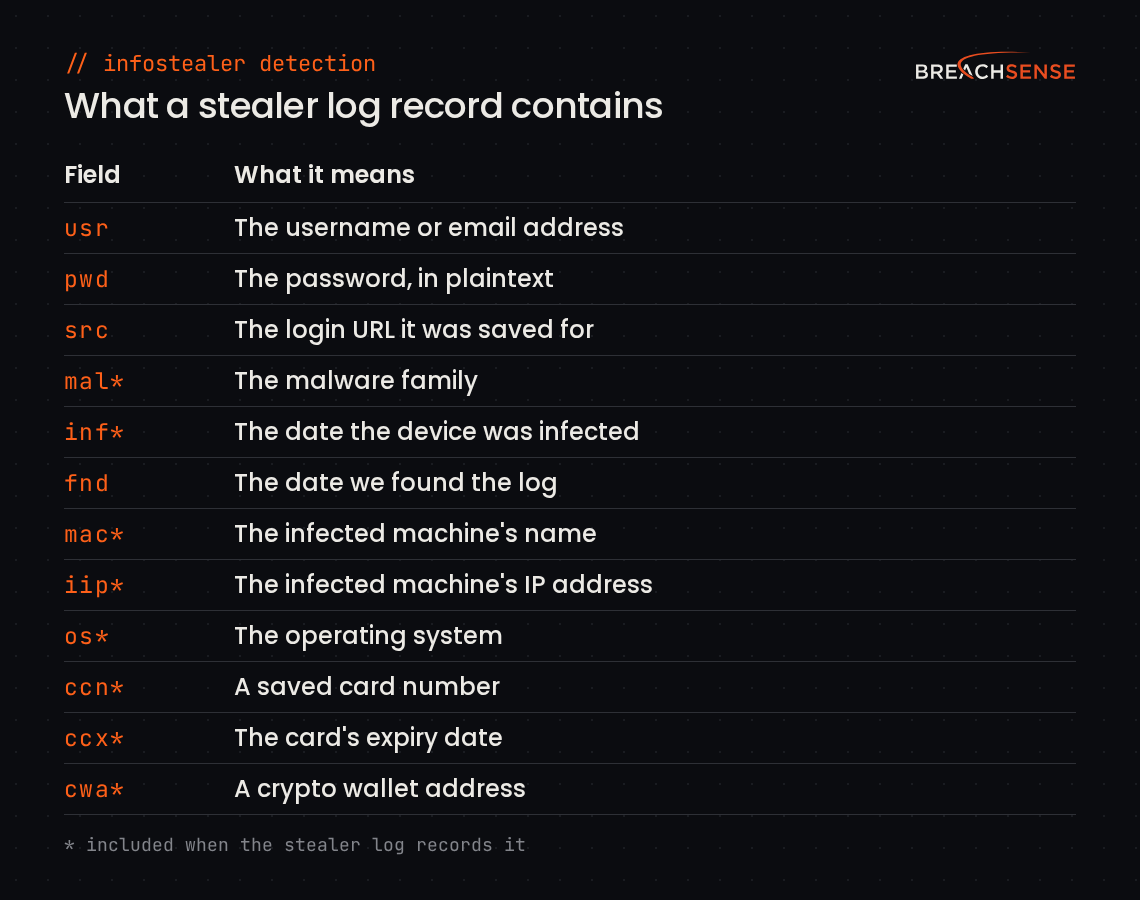
Each stealer log record gives you the username, the plaintext password and the login URL it was saved for. There’s nothing to crack, so you can check right away whether the employee still uses that password.
The login URL shows which system the credential is for, such as your VPN, your single sign-on portal or a SaaS app. Your team can reset the most sensitive accounts first.
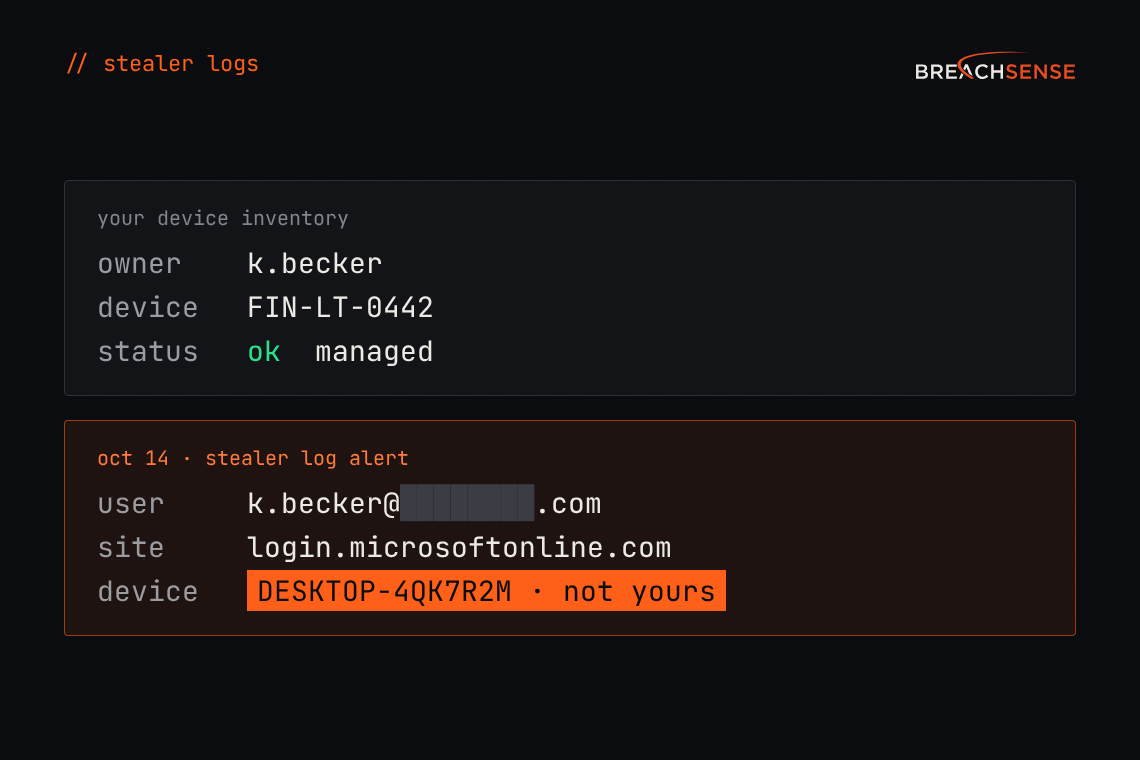
Each record includes the date we found the log. If the stealer log contains them, the record also includes the malware family and the infection date, plus the infected machine’s name, IP address and operating system. You can search stealer logs by domain, email address or IP address. If the stealer log contains them, the record also includes saved card numbers and crypto wallet addresses. Your fraud team can search by a truncated card number or a wallet address to find every log that contains it.
During incident response, you can also search by the leaked password. Once you confirm one compromised account, search for its password. The results include every stealer log record with that password. Look for the employee’s email address or username in them to find their other work accounts or a personal account. Have the employee change that password everywhere they used it.
Raw Session Cookies From Infected Browsers
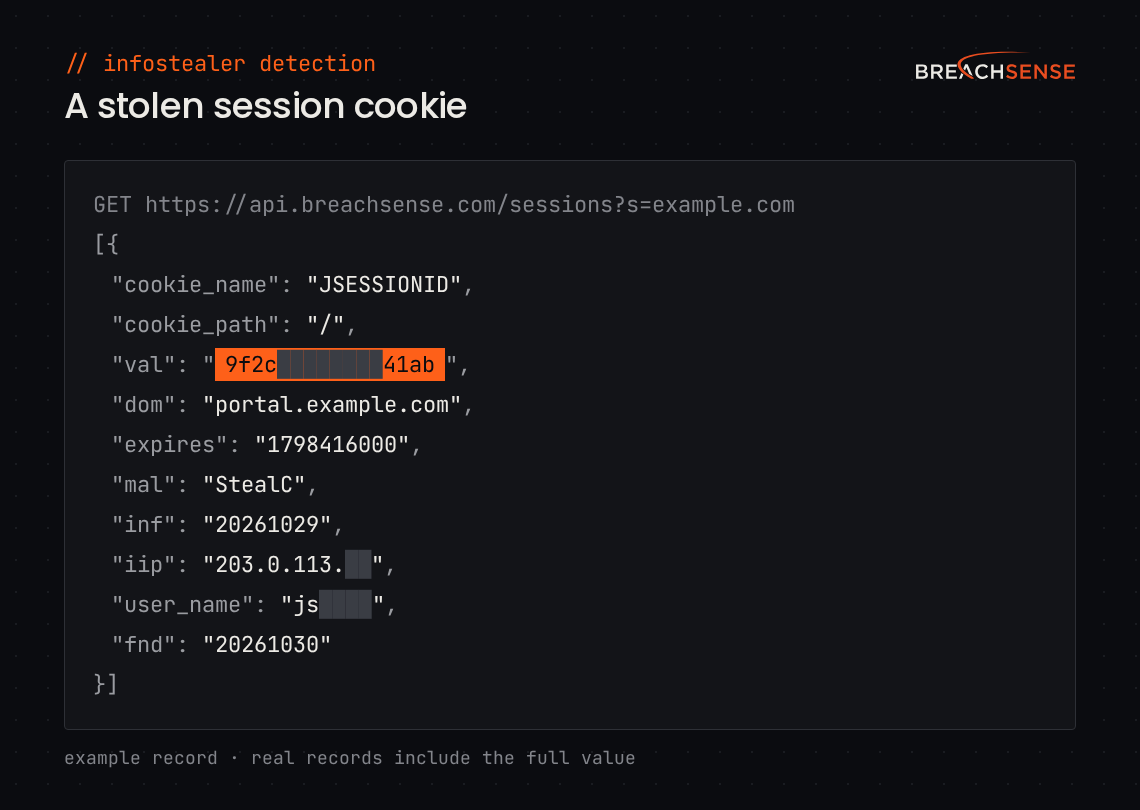
Each session alert includes the full stolen cookie, with its name, value, site and expiry date.
You choose which cookies to monitor. Add your own session cookie names to the watchlist with the :: separator, such as example.com::JSESSIONID. We send an alert when one of those cookies shows up in a stealer log.
The expires field shows the latest date a stolen cookie can still work. Your team can see which sessions may still be live and revoke those first. A password reset alone doesn’t terminate every signed-in session, so revoke the session too.
Each session record also includes the account name logged in on the infected machine. The account name shows whose machine it was, even when the cookie contains no user ID.
API Keys and Other Non-Human Identities
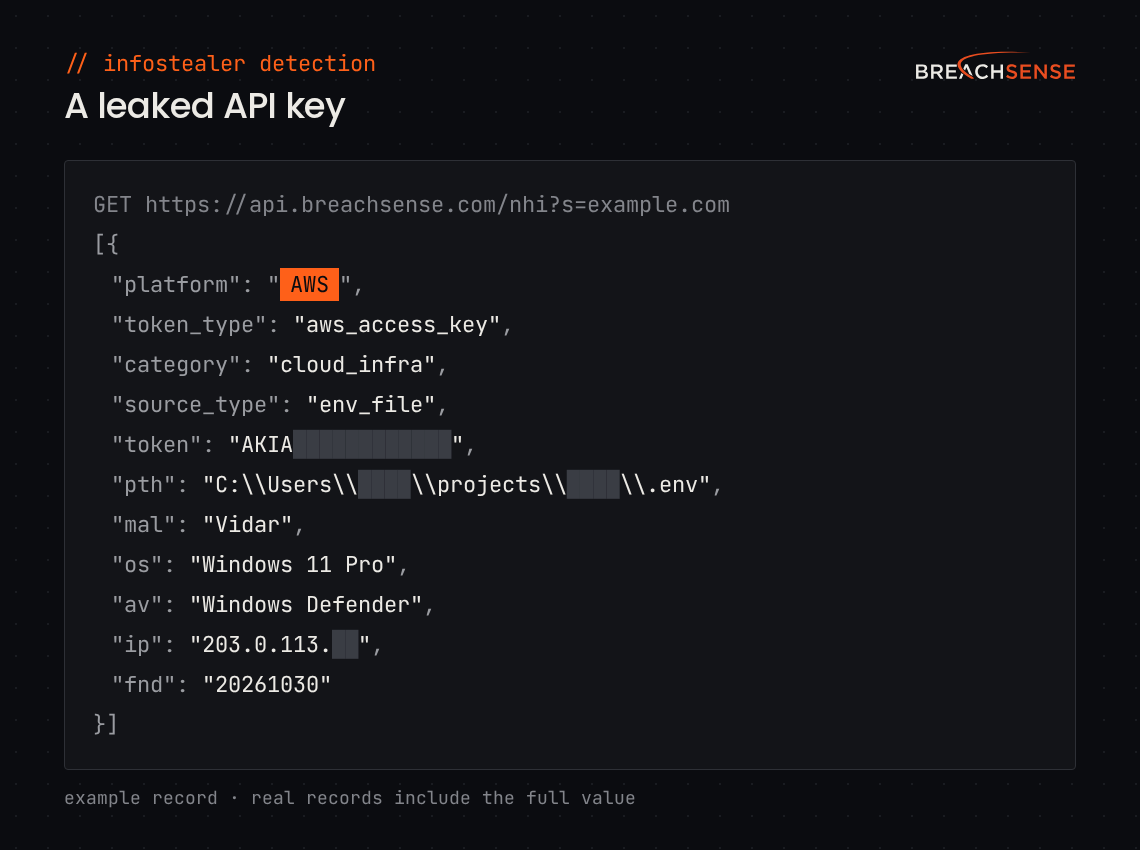
We also collect leaked API keys, OAuth tokens and service credentials, known as NHIs (non-human identities). We find them in stealer logs.
Each record includes the token type and the platform the key is for, such as AWS, GitHub or OpenAI. The record also shows where on the machine we found the key, such as a saved browser password or an environment file.
You can filter by platform or token type. For example, you can list every leaked AWS access key for your domain. A leaked API key doesn’t trigger an MFA prompt, so an attacker can use it until you rotate the key.
After you rotate a key, check the platform’s own logs, such as AWS CloudTrail, for any use of the key. The logs show whether anyone used the key before you rotated it.
How Teams Find Every Account Tied to an Infected Device
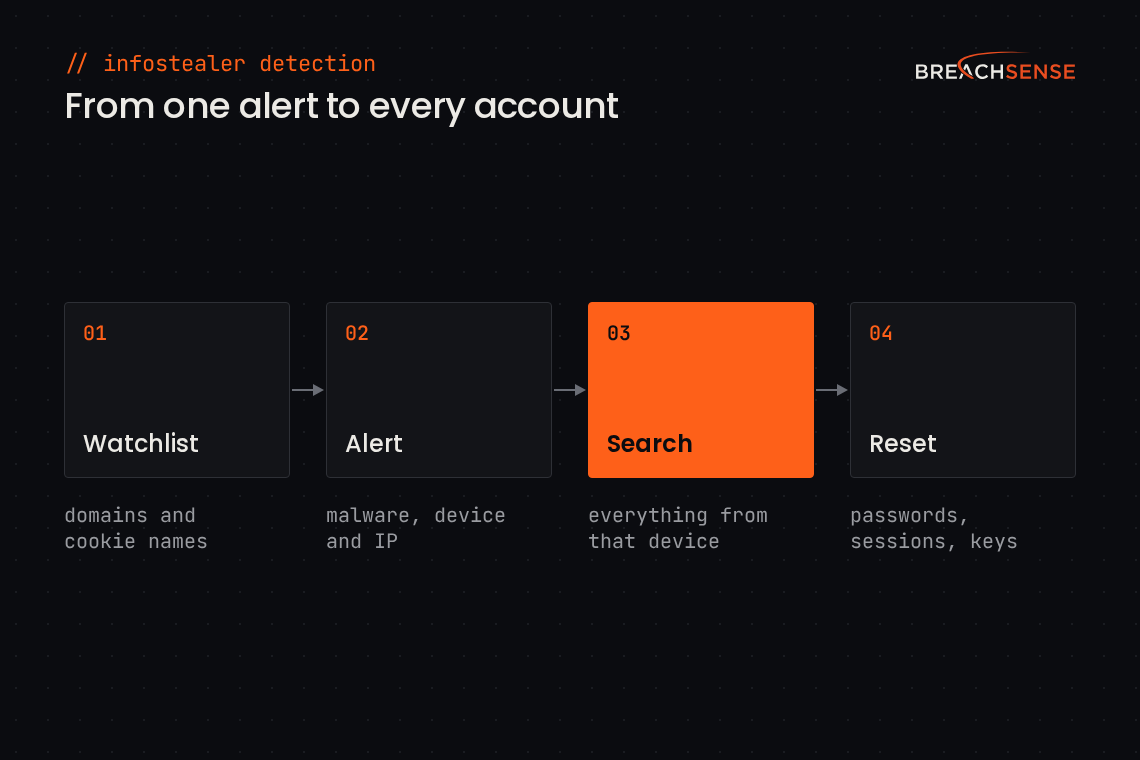
- Add Your Domains to the Watchlist
Add your company domains and the session cookie names you use, such as JSESSIONID, to your watchlist. A domain covers every email address on it, so you don’t add employees one by one. MSSPs (managed security service providers) can route each client’s alerts to that client’s own ticket queue or inbox. We check every new stealer log against your watchlist.
- Get an Alert
When an employee’s credentials or a session cookie you monitor shows up in a stealer log, we send an alert by webhook or email. The alert includes the leaked password or cookie. If the stealer log contains them, the alert also includes the malware family and the infected machine’s name and IP address. We can also post each alert to your SIEM (security information and event management) tool or ticket queue by webhook, an automatic message from our server to yours.
- Search Everything From That Device
When the alert includes the infected machine’s IP address, search our API for that address. You get every password, session cookie and API key we found in stealer logs from that IP address. You can also search a block of IP addresses, such as your office network. Then search by the employee’s email address to find their other leaked passwords, including ones saved on other infected devices. If the alert includes the infection date, check the employee’s sign-in logs back to that date.
- Reset, Revoke and Rotate
Revoke the stolen sessions, rotate the exposed API keys and reset the leaked passwords with your identity tools or your SOAR (security orchestration, automation and response) tool. Start with the sessions and keys, because a stolen cookie or API key works without the password. A playbook in your SOAR tool can start these steps as soon as the webhook alert arrives. Clean or reimage the infected device too, so the malware can’t steal the new passwords. Once the employee has changed a password, add their username and the old password to your whitelist. We then stop sending alerts for that credential.
How Breachsense Compares With Free Infostealer Checkers
Our free dark web scan, Hudson Rock’s free tools and Have I Been Pwned show whether credentials for your domain have leaked. None of these three free tools shows the leaked password.
Our dark web scan counts the leaked employee and customer credentials for a company domain. The counts cover stealer logs, combo lists, phishing kits and third-party breaches.
Hudson Rock’s free tools let you search any email address, username or domain, but only in stealer logs. A domain search shows how many employees, users and third parties were compromised. It also lists the login URLs that appear most. Hudson Rock says it adds compromised credentials to its database continuously. With a free account, you can monitor up to three email addresses, three usernames and three domains. Hudson Rock sends an alert when one of those email addresses, usernames or domains shows up in a new stealer log.
Have I Been Pwned’s main search shows which third-party data breaches an email address appears in. Have I Been Pwned’s stealer log search lists the websites where a password was saved under that email address. A company sees results only for domains it has verified. Individuals can see results for their own email address. API access to stealer logs needs a Pro subscription. Have I Been Pwned adds stealer logs in batches. The latest batch was added in June 2026.
With Breachsense monitoring, you get the plaintext password, the raw session cookie and the leaked API key for your domains. We index new stealer logs within hours. When a log matches your watchlist, we send an alert.
| Breachsense free scan | Hudson Rock free tools | Have I Been Pwned | Breachsense monitoring | |
|---|---|---|---|---|
| What you can check | Any company domain | Any email address, username or domain, in stealer logs only | Stealer logs for domains you've verified you own | Any domain, email address or IP address |
| What you get back | Counts of leaked employee and customer credentials | Counts and the most-seen login URLs | Websites with a saved password, without the password itself | Plaintext passwords, session cookies and API keys |
| How often it updates | New stealer logs indexed within hours, with no alerts | Hudson Rock says it adds compromised credentials continuously. Free alerts for 3 email addresses, 3 usernames and 3 domains | Stealer logs added in batches, latest in June 2026 | New stealer logs indexed within hours, with an alert for each watchlist match |
See Which of Your Accounts Are in Stealer Logs
On a demo call, we search your company’s domains for leaked passwords, session cookies and API keys. A trial is available after a demo call.
Book a demoFAQs
Infostealer detection is finding the credentials, session cookies and API keys that infostealer malware took from your users’ devices. You can then reset the passwords, revoke the sessions and rotate the API keys before an attacker uses them. Our credential monitoring also covers passwords leaked in third-party breaches, combo lists and phishing kits.
Yes. Our free dark web scan shows how many employee and customer credentials have leaked for a domain. Hudson Rock’s free domain search shows how many employees, users and third parties were compromised. It also lists the login URLs that appear most. Neither free check shows the passwords themselves, so you can’t tell whether an employee still uses the leaked password.
New stealer logs are indexed within hours. How fast we send your alerts depends on your package, which we put together on a demo call based on what you need. Each alert includes the date we found the log. If the stealer log contains it, the alert also includes the infection date, so you can see how long ago the device was infected.
Yes. EDR (endpoint detection and response) covers only the devices you manage. When EDR catches an infostealer, it doesn’t show which passwords and cookies the malware uploaded before it was removed. Stealer log monitoring shows which of your credentials are in stealer logs, so you know which ones to reset.
Yes. If an employee saved a work password, such as their Microsoft 365 password, in a browser on a home computer, an infostealer on that computer takes it. We send an alert when that work credential shows up in a stealer log, whichever computer it came from.
Attackers can, with the session cookies an infostealer steals. A session cookie is set after the user passes MFA, so an attacker who loads it into a browser is already signed in. The cookie works until it expires or you revoke the session. Leaked API keys don’t prompt for MFA either.
Read our monthly infostealer reports.