What Is Dark Web Monitoring? How It Works for Business
Quick Summary
Dark web monitoring means watching criminal forums, markets, Telegram channels, leak sites and phishing kits for your company’s stolen logins and data. When a match is found, your team gets an alert with the source and first-seen date. If malware on an employee’s computer stole the login, you have a device to clean and a password to reset.
Why stolen logins still lead to breaches
Verizon’s 2026 Data Breach Investigations Report (p.44) studied ransomware victims that had a credential leak or an infostealer infection in the year before they were attacked. An infostealer is malware that steals the passwords and session tokens (the cookies that keep you logged in) saved in a browser. Half of those victims had a leaked password in the 95 days before a ransomware group named them on its leak site.
Verizon doesn’t claim each leak caused the attack that followed. Still, a password that leaks weeks before an attack is one you could have reset, if someone on your team had known about it.
The sections below cover how dark web monitoring finds your leaked data and what your team should do once an alert is sent.
Why listen to us?
Breachsense is a dark web monitoring API that finds stolen credentials, session tokens and leaked files and delivers them to security teams so they can act before attackers do. We have over 41 billion leaked credentials indexed. Our founder, Josh Amishav, is a penetration tester with nearly 20 years in offensive security, and our research has been cited by TechTarget and The Register. Our entire focus is on dark web monitoring. The setup and triage steps in this post come from that work.
What is dark web monitoring?
Dark web monitoring is a service that finds data stolen from your company, such as employee logins and leaked files. It collects that data from six separate sources:
- Criminal forums and markets. Sellers list stolen databases and network access, or give them away.
- Telegram channels. Infostealer operators share and sell stolen logins in these channels.
- Ransomware leak sites. Ransomware groups publish files from victims that didn’t pay.
- Combo lists. These are lists of email and password pairs, compiled from older breaches and used to try the same login on other sites.
- Stealer logs. These are the files an infostealer sends to its operator from an infected computer. They’re usually fresher than combo lists, because operators post them soon after the infection.
- Phishing kits. Every kit has to send the passwords it steals somewhere, and some of those destinations can be monitored. A password caught there is one the employee typed into the fake page, so it’s almost certainly their current one.
The deep web is everything search engines don’t index, such as your inbox or a bank’s account pages. The dark web is a small part of the deep web that needs special software like Tor to reach. Only some of the sources above sit on the dark web itself. Telegram and many combo lists are on the open internet, so “dark web monitoring” covers more than Tor sites.
Matches from those sources come in these forms:
- Passwords. Employee and customer logins, sometimes in plaintext and sometimes in a hashed format (scrambled versions that have to be cracked first).
- Session tokens. A stolen session token lets an attacker bypass MFA (multi-factor authentication).
- API keys and other machine credentials. OAuth tokens (the logins apps use to talk to each other) and service account secrets sit in stealer logs alongside passwords. Many don’t expire on their own, so a leaked key can stay valid long after the leak.
- Infected devices. The computer name, IP address, or hardware ID in a stealer log tells you which machine to clean up.
- Leaked files. Documents get published after a breach or a ransomware attack. When the victim is one of your vendors, your data may leak in their breach.
How does dark web monitoring work?
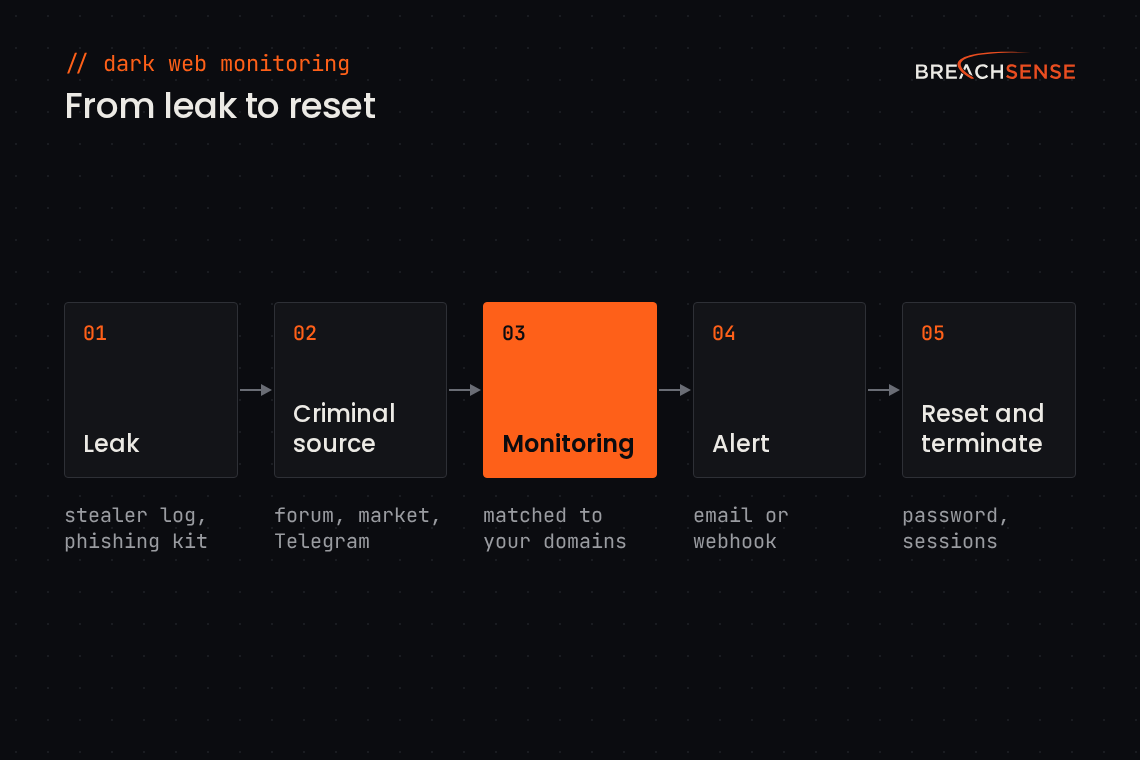
Dark web monitoring collects leaked data and checks each new record against your monitored search terms, like company domain or employee email addresses.
Collect. The provider pulls new data from the sources above and parses it into records. A credential record, for example, holds a username, a password, and often the site the password was used on.
Match. Each new record is checked against what you’ve asked to monitor, usually your domains, company name, and C-level executives. A record for jane@yourcompany.com triggers an alert. The same employee’s personal Gmail address won’t unless it’s on your watchlist.
Alert. Matches are sent to your team or your tools via email or webhook. A webhook pushes each alert to your servers, such as a SIEM, SOAR, or ticketing system. A useful alert carries the source and the date the record first appeared. Having said that, dates from combo lists can’t always be trusted because they tend to get repackaged and releaked. Threat actors often do this to increase the size of the files they’re selling.
Dark web monitoring vs a dark web scan
A dark web scan is a one-time search for leaked credentials tied to your domain. Dark web monitoring runs all the time and alerts you when a new leak appears.
| Dark web scan | Dark web monitoring | |
|---|---|---|
| How often it runs | Once, when you run it | All the time |
| What you get | A list of past leaks tied to your domain | An alert for each new leak, with its source and date |
| Who it suits | Teams checking their exposure for the first time | Security teams and MSPs that handle data leaks as part of daily operations |
You can run a free scan on your company’s domain, or read more about what a dark web scan is.
Benefits of dark web monitoring
Early warning before an attack
A stolen login can change hands several times before anyone exploits it. Infostealer operators sell logs in batches. Buyers sort through them for corporate accounts worth using or reselling. If your threat intel provider indexes the log while it’s still being resold, you can reset the credentials before they’re exploited.
For example, an alert might include an engineer’s VPN (virtual private network) password in a stealer log posted yesterday. Your team can reset the password and terminate the engineer’s valid session tokens. Then they check the VPN authentication logs for unauthorized access.
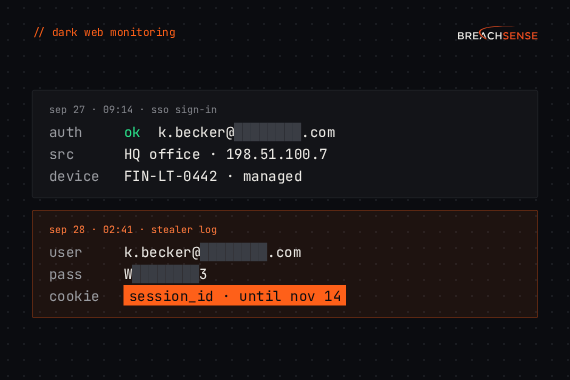
If the VPN logs are clean, the password probably hadn’t been used on the VPN yet. If they aren’t, the first unfamiliar sign-in gives you a start date for the incident response investigation.
Password resets based on evidence
NIST, the US standards body, says in SP 800-63B-4 that you shouldn’t make staff change passwords on a schedule. The same section says verifiers (the systems that check passwords) “SHALL force a change if there is evidence that the authenticator has been compromised.” A leaked password that’s still in use is that evidence. Everyone else can keep their password.
A plaintext password lets you check whether it still matches what the employee uses today. If it matches, reset that account. A hash from an old breach only tells you that some password leaked, possibly one that was changed years ago.
Visibility past your own network
Your EDR (endpoint detection and response) and email security only cover devices and accounts you manage. Plenty of leaks happen outside them:
- An employee signs in to work email from a personal laptop that’s infected with infostealer malware.
- A contractor’s laptop gets infected while their browser contains a saved password to your admin portal.
- A vendor gets hit by ransomware, and the leaked files include your customer list.
Dark web monitoring can catch all three by matching search strings associated with your company, such as your domain names or company name. To find your data in a vendor’s breach, you’ll need a dark web monitoring tool that indexes the full text from all leaked files.
An attacker who includes a stolen session token in their web requests is essentially logged in as that user. The MFA prompt has already been passed. In many apps, changing the password doesn’t terminate sessions that are already open. So terminate the user’s open sessions after the reset, or the attacker who hijacked the session stays logged in.
The example below, with made-up details, shows how one stealer-log entry pairs a saved login with a session token. The session token in this example expires seven weeks after the log date. Until then, the site may keep accepting it unless the session is terminated.
{
  "url": "https://login.example-sso.com/",
  "username": "j.smith@example.com",
  "password": "Wint3r********",
  "cookie": {
    "domain": ".example-sso.com",
    "name": "session_id",
    "value": "eyJhbGciOi...[redacted]",
    "expires": "2026-11-14"
  },
  "computer_name": "DESKTOP-7K2QX",
  "log_date": "2026-09-28"
}
How to set up dark web monitoring
1. Decide what to monitor
Start with the things that identify your company in stolen data:
- Company domains. Include all of your domains and the domains of companies you’ve acquired. Accounts on those domains can stay active long after a rebrand.
- Email patterns and aliases. Shared mailboxes like billing@ leak too, and they rarely have one owner to notify.
- Executives’ emails. Add personal email addresses for C-level executives. An executive whose personal device gets infected may leak corporate data as part of that breach.
- Key vendors’ domains. A payroll provider or a vendor like an MSP (managed service provider) that gets breached can leak your data or logins to your systems.
- API keys. A key to a critical service, like an LLM or your code repository, can leak highly sensitive information.
2. Choose coverage and how to receive alerts
Ask every provider these four questions:
- Do you collect the data yourself or license it?
- How fast do new leaks show up? Ask for the time between a leak being posted and the alert reaching you.
- Does each record show its source and first-seen date? Without a date, a new leak and a combo list recycling a 2019 breach look the same.
- Are passwords in plaintext, or only hashes? Plaintext passwords let you check whether the leaked password is still in use.
The simplest way to receive alerts is via email. This works for small teams, but makes them harder to automate. Larger teams should use webhook notifications or query an API. This way alerts get sent directly into your SIEM or SOAR. A SIEM collects your security logs in one place, and a SOAR runs response steps automatically, such as opening a ticket. Some providers also show alerts in a dashboard, which only helps if someone remembers to log in and check it.
Breachsense has no dashboard to log in to. It pushes the alert directly into your SIEM or SOAR. Your tools can also pull the same data through the API. You can see how our dark web monitoring for business works, or compare providers in our list of dark web monitoring tools.
3. Write the response playbook
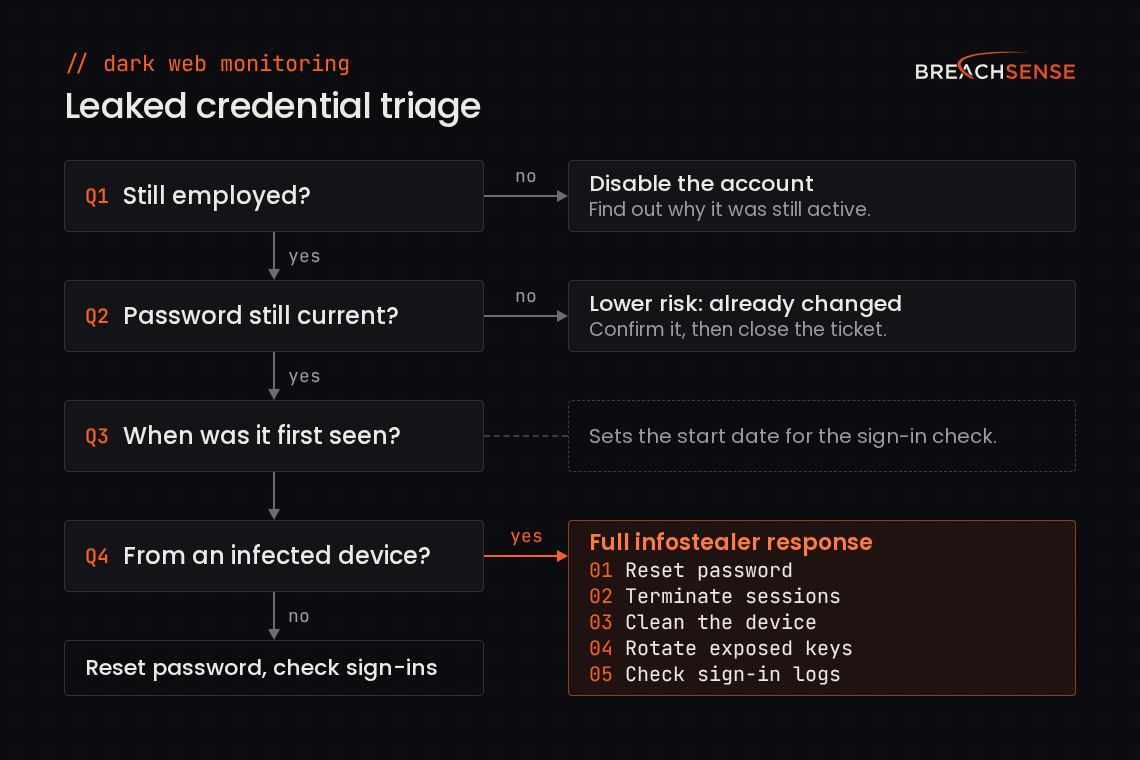
Decide how to respond before an incident ever happens. Triage each alert with four questions:
- Does the person still work here? If not, disable the account and find out why it was still active.
- Is the leaked password still the current one? If you run Active Directory, a script can hash the leaked password and compare it with the stored hash, with no lockouts or MFA prompts. Otherwise, just test it (with permission) or reset it.
- When was it first seen? A password leaked last week needs immediate action. A match from a 2019 breach usually includes a password that’s long been changed, so confirm that and close the ticket.
- Did it come from an infected device? A stealer log means the machine itself is compromised, along with everything saved in its browser.
Then respond in this order:
- Reset the password.
- Terminate the user’s sessions. Do this after the reset, or the attacker can sign back in with the old password.
- Clean or reimage the infected device. Keep the user off that machine until it’s clean, or the malware will steal the new passwords as well.
- Rotate any API keys or secrets the log exposed.
- Pull the account’s sign-ins from your identity provider, such as Entra ID or Okta, and from your VPN. Start from a little before the leaked credential’s first-seen date, because the theft can happen before the record shows up on the dark web. Look for sign-ins from new devices or locations, and for MFA methods the employee didn’t add.
Our response playbooks by use case give the steps and time limits for each alert type, including session token and vendor breach alerts.
What to ask before you buy dark web monitoring
When you compare providers, ask two questions. How soon after a leak is posted does the alert reach you? And does that alert go straight into your security stack? A leak you get notified about months afterwards may already be too late. An alert that sits in an inbox or a dashboard isn’t acted on until someone checks it.
Book a demo to see your real leaked data on the call. Schedule a trial afterwards to test Breachsense against your specific use cases.