Best Threat Intelligence Feeds for Security Teams (2026)
Learn how to choose threat intelligence feeds by how fresh they are and what their license lets you do.
• Judge a feed by how often it updates and whether your tools can read its format
• Read the license before you deploy a free feed, because several are free only for non-commercial use
• Paid feeds such as Recorded Future and Google Threat Intelligence link indicators to threat actors, though some lists cost extra
• IOC feeds tell you what to block. A credential feed tells you which employee passwords were stolen
In the SANS 2025 CTI Survey, 37% of respondents said fragmented CTI tools or feeds held back their threat intelligence program. Each feed you add is one more format to parse and one more source to keep running.
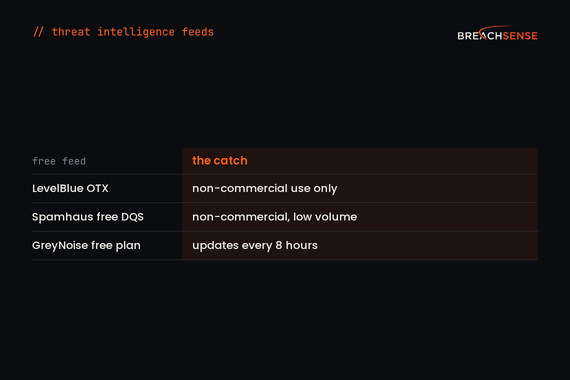
Free doesn’t always mean free to use at work. OTX and Spamhaus’s free DNS service both allow free use for non-commercial purposes only.
What Are Threat Intelligence Feeds?
A feed is threat data your tools can read without a person in the loop. Most feeds come as a file download or an API endpoint. Spamhaus’s lists work as DNS lookups instead.
Why Do Feed Quality and Freshness Matter?
Feeds update on very different schedules. URLhaus updates its downloadable lists every 5 minutes. GreyNoise’s free plan updates every 8 hours. Google Threat Intelligence generates a threat list every hour. Each list becomes available two hours later. At noon UTC, the newest list you can download is the 10:00 list. Ask for the update interval before you put a feed on an automatic block rule.
Pick feeds that say who is behind an indicator. An IP tied to a ransomware group’s campaign goes to the top of your queue. An IP seen once in a mass scan can wait.
Weight indicators by their source. An IP seen in an active intrusion is worth blocking automatically. An indicator pulled from an old malware sample may only be worth an alert.
What Types of Threat Intelligence Feeds Exist?
Indicators of compromise (IOCs) are traces that point to malicious activity, such as a malicious IP address or a malware file hash. Your security tools match them against network traffic and files to detect threats.
Most feeds list malicious IP addresses and domains. Hash feeds list malware files instead.
URL feeds are more precise than domain feeds. One domain can host both legitimate and malicious pages, so blocking a single URL leaves the rest of the site reachable.
Vulnerability feeds flag the CVEs attackers are exploiting. CISA’s KEV catalog, covered below, is the best-known free one.
Credential feeds send an alert when your organization’s credentials show up in stealer logs or third-party breaches.
Which Free and Open Source Feeds Should You Consider?
Check the license first. OTX and Spamhaus’s free DNS service are for non-commercial use only. abuse.ch’s terms limit free platform access to not-for-profit use. Some abuse.ch blocklists, such as SSLBL, are released under CC0 for any use. For the other abuse.ch platforms, commercial users may need a subscription through Spamhaus.
LevelBlue Open Threat Exchange (OTX)
LevelBlue’s Open Threat Exchange, formerly AlienVault OTX, is a community where members publish indicators in groups called pulses.
Strengths:
- Your firewall or IDS can pull the pulses you subscribe to through the DirectConnect API or Python SDK.
- OTX also runs a TAXII 1.1 server.
Limitations:
- Any member can publish a pulse, so quality depends on who published it.
Best For: Researchers and non-profits that want community indicators in a firewall or IDS.
abuse.ch Feeds
Available Feeds:
- URLhaus: Malicious URLs used to spread malware
- ThreatFox: Indicators of compromise linked to malware
- Feodo Tracker: Botnet command-and-control servers
- SSL Blacklist (SSLBL): Malicious SSL certificates and JA3 fingerprints
- MalwareBazaar: Newly observed malware samples
Strengths:
- URLhaus updates its downloadable lists every 5 minutes.
- URLhaus exports in CSV, JSON and MISP formats. It also offers a DNS response policy zone and Snort or Suricata rules.
Limitations:
- Feodo Tracker’s datasets have been empty since Operation Endgame.
Best For: Teams that want narrow feeds, such as malware URLs, in their DNS or IDS rules.
CISA Known Exploited Vulnerabilities (KEV)
CISA’s KEV catalog lists vulnerabilities that attackers have exploited in the wild. Verizon’s 2026 DBIR found that only 26% of KEV vulnerabilities were fully patched in 2025. Check your own backlog against the catalog first.
Strengths:
- The catalog had 1,745 entries on October 14, 2026, a list small enough to compare with your vulnerability scanner’s findings.
- Each entry says whether the vulnerability is known to be used in ransomware campaigns. On October 14, 361 entries had that flag, so patch those first.
Limitations:
- Each entry’s due date applies only to US federal civilian agencies. CISA tells everyone else to use the catalog to decide what to patch first.
Best For: Vulnerability management teams deciding what to patch first.
Spamhaus
Spamhaus publishes DNS blocklists, used mostly to filter email.
Available Lists:
- SBL: Malicious network ranges
- XBL: Compromised IPs
- PBL: IP addresses that shouldn’t send email directly
- DBL: Low-reputation domains
Strengths:
- Spamhaus’s ZEN list combines its IP blocklists, including the SBL, XBL and PBL, in one DNS query.
Limitations:
- Spamhaus is retiring its free public DNS mirrors. If your mail server still queries the public mirrors, you’ll need to move to Spamhaus’s Blocklists via DNS Query service.
Best For: Mail gateways that block spam sources and compromised IPs.
MISP Default Feeds
The MISP project’s feed catalog lists 108 default feeds from 52 providers.
Strengths:
- The default feeds come pre-configured in MISP, so you turn them on instead of writing parsers.
- MISP correlates feed indicators with the events you already store.
Limitations:
- You need to run and maintain a MISP server.
Best For: MISP users who want to switch on dozens of feeds in one place.
Which Commercial Feeds Are Worth the Cost?
Paid feeds add context, such as the threat actor or campaign behind an indicator. Google sells some threat lists only with higher license tiers.
Recorded Future
Recorded Future, owned by Mastercard since December 2024, sells risk lists of IP addresses, domains, URLs, file hashes and vulnerabilities. The default lists include only indicators that Recorded Future scores as malicious. Recorded Future’s Insikt Group researchers publish threat research reports.
Rating: 4.5/5 on G2
Strengths:
- The Intelligence Graph links an indicator to the threat actors and exploits behind it in one view.
- Insikt Group reports help analysts write their own intelligence, though some research comes out late.
Limitations:
- Identity intelligence and third-party risk are sold as separate add-on modules.
- Field names in the query language don’t match its variable names, which makes queries hard to write.
- WHOIS and passive DNS coverage is thinner than on other platforms.
Best For: SOCs that want risk-scored indicator lists in their SIEM, with Insikt Group research behind them.
CrowdStrike Falcon Adversary Intelligence
CrowdStrike says Falcon Adversary Intelligence includes a built-in malware sandbox and real-time IOC feeds. The Premium tier adds prebuilt YARA and Snort detection rules.
Rating: 4.7/5 on Gartner Peer Insights
Strengths:
- When an alert fires, analysts can open the threat actor’s profile, with its techniques mapped to MITRE ATT&CK.
- The intelligence is built into Falcon’s EDR detections, so analysts move from an indicator to live endpoint activity in one console.
Limitations:
- Licensing and add-ons push up the total cost.
- The intelligence feeds need tuning when you first set them up.
- The dashboards are hard to customize.
Best For: CrowdStrike Falcon customers who want adversary context inside their EDR detections.
Google Threat Intelligence (Mandiant)
Google now sells Mandiant’s threat intelligence as Google Threat Intelligence. Google Threat Intelligence combines Mandiant’s incident response findings with indicators from VirusTotal’s user community. In 2024, Google said Mandiant runs over 1,100 investigations a year.
Strengths:
- Threat lists come in categories, such as ransomware and phishing, so each control gets only the list it needs.
- You can filter a list to indicators linked to a campaign or threat actor, or by Google’s own threat score.
Limitations:
- Only the ransomware and malicious network infrastructure lists come with every license. The phishing and infostealer lists need Enterprise Plus.
- Mandiant service accounts didn’t move to Google Threat Intelligence. Older Mandiant integrations need a new API key and new API URLs to keep working.
Best For: Teams that want Mandiant’s incident response findings and VirusTotal data in one feed.
Flashpoint
Flashpoint collects intelligence from ransomware sites and closed Telegram channels, among other sources. Its Ignite API includes technical indicators. A Splunk app pulls those indicators into a lookup table. Flashpoint’s analysts also write intelligence reports and answer requests for information (RFIs).
Rating: 4.5/5 on G2
Strengths:
- Analysts can see where a piece of intelligence came from and investigate that source themselves.
- A reviewer found Flashpoint’s alerts easy to connect to their SOAR platform.
Limitations:
- One reviewer rates the quality of Flashpoint’s IOCs below other vendors’ IOCs.
- A reviewer says frequent platform changes and thin documentation keep breaking their integrations.
- The reviewer who rated the IOCs also says keyword alerts produce many false positives until Flashpoint’s customer success team helps tune them.
Best For: Fraud and threat intelligence teams that investigate criminal communities.
GreyNoise
GreyNoise runs thousands of sensors that record IPs scanning the internet. GreyNoise labels each IP as benign, malicious, suspicious or unknown.
Strengths:
- A benign label means GreyNoise has tied the IP to a known, legitimate actor. That label lets you rule out an alert quickly.
- GreyNoise Block builds blocklists you can push to your firewall.
- The free plan includes up to 50 searches a week and Community API access.
Limitations:
- The free plan keeps up to 10 days of history. The Advanced plan keeps 30 days.
- An IP that an attacker uses only against your network never reaches GreyNoise’s sensors, so GreyNoise has no label for it.
Best For: SOC teams with many alerts from internet scanners.
Breachsense
Breachsense finds your organization’s credentials in stealer logs and third-party breaches. It also covers combo lists and passwords employees typed into phishing pages. Its alerts include the leaked credentials themselves, so you know which accounts to reset.
Rating: 4.8/5 on G2
Strengths:
- We send passwords from stealer logs in plaintext, so you can check whether the employee still uses that password. We crack password hashes from breaches where we can.
- You can also give us the name of a session cookie to watch, such as JSESSIONID for your domain. We send an alert when we find that cookie in a stealer log, so your team can revoke the user’s session.
- You can search the full text of files leaked in ransomware attacks, third-party breaches and unsecured databases. We send an alert when a term you monitor shows up in a new file.
- Integration takes hours. You get a license key and example API queries.
Limitations:
- Breachsense doesn’t sell IOC feeds of attacker IPs or malware hashes.
Best For: Security teams and MSSPs that need to reset compromised accounts and find their data in a supplier’s leaked files.
How Should You Evaluate Feed Quality?
Test against known indicators. Take IOCs from recent public incident reports. Does the feed contain them? How soon did they appear after the report came out?
Measure false positives. Run the feed against your environment for a week. How many of its alerts turn out to be legitimate traffic?
Check what your license tier includes. Ask each vendor which indicator lists come with the tier you’re quoted, and which cost extra.
Check the format. Does the feed support STIX/TAXII? Can your SIEM ingest it without a custom parser?
How Do You Integrate Feeds Into Your Security Stack?
Use a threat intelligence platform. A TIP like MISP or OpenCTI handles format conversion for you. OpenCTI, from Filigran, stores everything as STIX 2.1 and has more than 400 connectors. Its Community Edition is free.
Expire old indicators. An IP address that was malicious six months ago can belong to someone else today.
Monitor feed health. Feeds go quiet and change formats. abuse.ch’s Feodo Tracker has been empty since Operation Endgame. If your blocklist relied on it for botnet command-and-control IPs, find another source for them, such as ThreatFox. Set up an alert for when a feed stops updating.
Which Feed Tells You Which Employee Passwords Were Stolen?
IOC feeds don’t tell you which of your employees’ passwords an attacker already has. Verizon’s 2026 DBIR found credential abuse at some point in 39% of breaches.
Dark web monitoring finds employees’ stolen passwords in stealer logs and third-party breaches. A stealer log can also contain the employee’s session tokens. With a stolen session token, an attacker can log in without the password or MFA. So revoke the employee’s sessions after the password reset.
Breachsense sends credential alerts by webhook or email. Your SOAR or identity provider can then reset the password and revoke the session.
Conclusion
Breachsense is a dark web monitoring API for security teams and MSSPs who need to know when staff or customer credentials have already been stolen. It finds passwords and session tokens taken by infostealer malware, plus passwords and one-time MFA codes typed into phishing pages. Breachsense sends alerts by webhook or email, so teams can reset passwords and revoke stolen sessions before attackers use them.
Run a free dark web scan to see which of your credentials have leaked, or book a demo to walk through the API.