13 Best Attack Surface Management Tools (2026)

Quick Summary
The best attack surface management (ASM) tools are Breachsense for subdomain mapping plus leaked credentials, Microsoft Defender External Attack Surface Management for Azure teams, and Cortex Xpanse for large enterprises with subsidiaries.
| Tool | Best for | Starting price | Rating (source) |
|---|---|---|---|
| Breachsense | Teams that want their subdomains mapped and lookalike domains flagged, plus stolen credentials and session tokens for their own domains | Not published | 4.8/5 (G2) |
| Microsoft Defender External Attack Surface Management | Azure teams that want attack surface data to query in Microsoft Sentinel | $0.011 per asset per day | 4.3/5 (G2) |
| Cortex Xpanse | Large enterprises that want some exposures fixed automatically, with the Active Response add-on | Not published | 4.5/5 (Gartner Peer Insights) |
Why exploited vulnerabilities are now the most common way attackers get in
Verizon’s 2026 Data Breach Investigations Report found that 31% of breaches started with an exploited vulnerability, up from 20% a year earlier (p.15). An attacker can only exploit a system they can reach. Verizon’s advice is to create an asset inventory of your internet-facing systems and remove the ones you don’t need (p.32). A server, VPN (virtual private network) gateway or test app that’s missing from your asset list doesn’t get patched. ASM tools find those systems, so your team can patch them or lock them down.
The 31% statistic counts only how attackers gained initial access. Verizon also counted credential abuse at any stage of a breach, and found it in 39% of breaches (p.16). So we checked whether each of the 13 tools shows leaked credentials for your domains. Ratings, pros and cons come from user reviews on G2 and Gartner Peer Insights (where enough reviews exist).
Why listen to us?
Our founder, Josh Amishav, ran penetration tests for nearly 20 years. On retests, after a client had fixed the vulnerabilities reported, leaked passwords often still got his team access. He built Breachsense to find leaked employee passwords and company data. Breachsense also maps your subdomains. It alerts you when an employee’s password for an app on one of those subdomains leaks. Kaspersky ICS CERT and The Register have cited our research.
What are attack surface management tools?
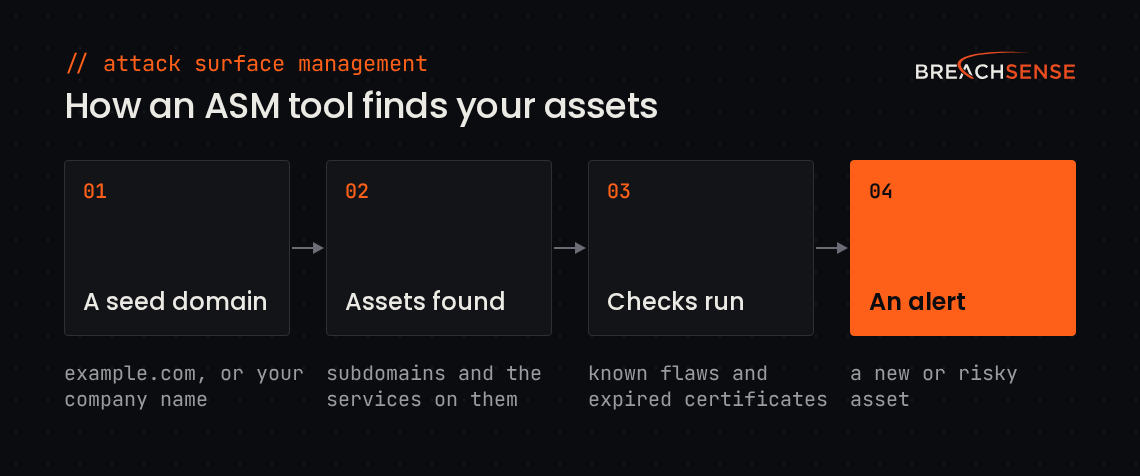
Attack surface management (ASM) tools continuously find, classify and monitor every internet-facing asset an attacker could target, such as forgotten subdomains and cloud servers. Some ASM tools start from a domain or company name you give them, and others start from the vendor’s own scans of the entire internet.
Unlike an ASM tool, a vulnerability scanner tests only the hosts on your list. Vendors whose tools cover only internet-facing assets often call them EASM tools. EASM is short for external attack surface management.
Why is attack surface management important?
- Your attack surface grows every month. The average organization adds over 300 new services to its attack surface each month, according to Unit 42’s 2024 Attack Surface Threat Report (p.3). Those new services account for nearly 32% of the average organization’s new high or critical cloud exposures.
- Shadow IT makes a breach cost more. IBM’s Cost of a Data Breach Report 2026 lists shadow IT as one factor that raises breach costs. IBM defines the factor as not knowing how many applications your company runs, or where. Breaches with that factor cost $201,165 more than the average breach (Figure 33).
- Known exploited vulnerabilities stay open for weeks. The US Cybersecurity and Infrastructure Security Agency (CISA) keeps the Known Exploited Vulnerabilities list. Verizon studied vulnerability scanner data from more than 13,000 organizations. Of the vulnerabilities on CISA’s list that those scanners found, only 26% were fully patched in 2025. The median time to fully patch a listed vulnerability was 43 days from detection (Verizon 2026 Data Breach Investigations Report, p.17).
- Forgotten assets don’t get patched or monitored. Patch schedules and log monitoring cover the servers on your asset list, so a test server nobody remembers gets neither.
- A stolen credential needs no exploit. An attacker with an employee’s leaked password can sign in to an internet-facing app that doesn’t require MFA (multi-factor authentication). A stolen session token gets past MFA, because the employee already completed MFA when the session started.
13 best attack surface management tools
- Breachsense
- Microsoft Defender External Attack Surface Management
- Cortex Xpanse
- CrowdStrike Falcon Exposure Management
- Mandiant Attack Surface Management
- Tenable One Attack Surface Management
- Rapid7 Surface Command
- CyCognito
- Censys Attack Surface Management
- Wiz ASM
- Qualys CyberSecurity Asset Management
- Intruder
- Detectify
| Tool | Best for | How discovery starts | Starting price | Rating (source) |
|---|---|---|---|---|
| Breachsense | Teams that want their subdomains mapped and lookalike domains flagged, plus stolen credentials and session tokens for their own domains | Seed domains | Not published | 4.8/5 (G2) |
| Microsoft Defender External Attack Surface Management | Azure teams that want attack surface data to query in Microsoft Sentinel | Seed domains, or your company’s entry in Microsoft’s prebuilt inventory | $0.011 per asset per day | 4.3/5 (G2) |
| Cortex Xpanse | Large enterprises that want some exposures fixed automatically, with the Active Response add-on | Palo Alto Networks’ own internet-wide scans | Not published | 4.5/5 (Gartner Peer Insights) |
| CrowdStrike Falcon Exposure Management | CrowdStrike customers who want external exposures ranked with CrowdStrike threat intelligence | CrowdStrike’s own internet-wide scans | Not published | 4.5/5 (Gartner Peer Insights) |
| Mandiant Attack Surface Management | Teams that want to check the exposures of a company they plan to buy | Seed domains, plus your cloud accounts | Not published | Not enough reviews |
| Tenable One Attack Surface Management | Tenable customers who want a Tenable scan started on any asset Tenable One ASM finds | Seed domains, plus domains Tenable suggests | Not published | Not enough reviews |
| Rapid7 Surface Command | Teams that want internal and external assets in one asset graph | Seed domains and IP ranges, plus your existing tools | Not published | 4.5/5 (Gartner Peer Insights) |
| CyCognito | Enterprises that need to find their subsidiaries’ assets starting from a company name | Your company name | Not published | 4.7/5 (Gartner Peer Insights) |
| Censys Attack Surface Management | Teams that want every port on their assets checked by internet-wide scans | Seeds, plus Censys’s own internet-wide scans | Not published | 4.4/5 (Gartner Peer Insights) |
| Wiz ASM | Wiz customers who want to see which exposures lead to an attack path in their cloud | Your cloud accounts, plus seed domains | Not published | Not enough reviews |
| Qualys CyberSecurity Asset Management | Qualys VMDR customers who want discovered assets kept up to date in their ServiceNow or BMC asset database | Your company name or seed domains | Not published | 4.4/5 (Gartner Peer Insights) |
| Intruder | Small teams that want their cloud accounts checked for new hosts every 2 hours, and each new host scanned | Domains you add, plus your cloud accounts | Free plan; Cloud plan $299/month (5 targets) | 4.8/5 (G2) |
| Detectify | Teams that want their subdomains tested with checks written by ethical hackers | Domains you add | Platform fee from €0/year, plus a fee per domain | 4.5/5 (G2) |
1. Breachsense
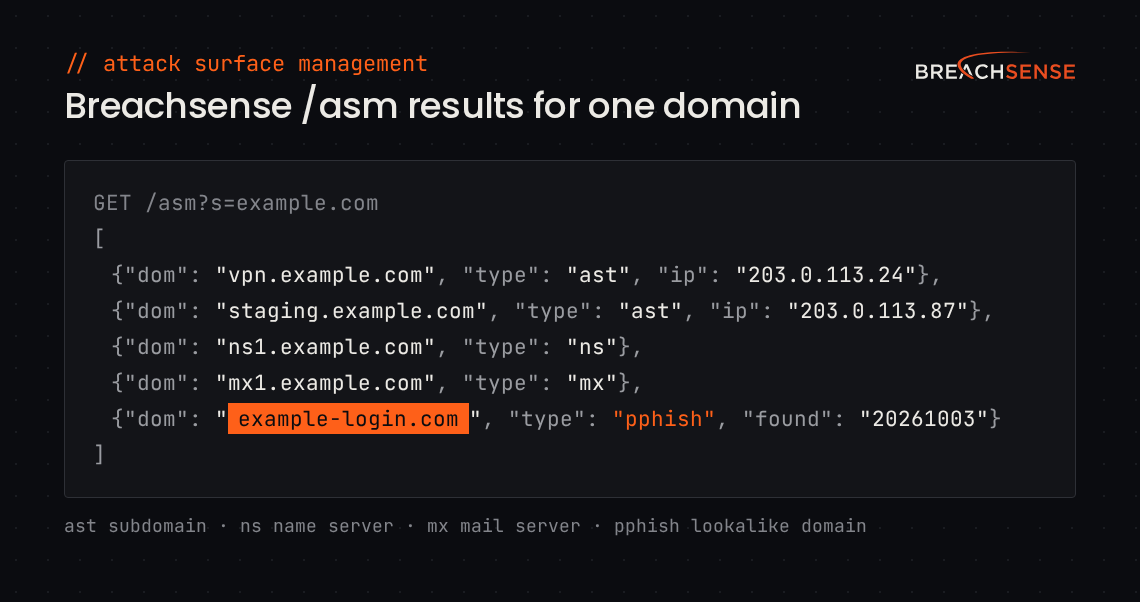
Breachsense is an API that maps your external attack surface. You add a domain, and the /asm endpoint returns the domain’s subdomains, plus its name servers and mail servers. The same endpoint flags lookalike domains registered to phish your employees or customers.
Breachsense indexes over 42 billion leaked credentials. A separate /stealer endpoint returns credentials from stealer logs, the files of saved passwords that infostealer malware sends from infected devices. Each credential includes the site the password was used on. When that site is one of your subdomains, you know which of your apps an attacker has a password for. Other endpoints return leaked session tokens and API keys.
Breachsense doesn’t scan for vulnerabilities, so teams pair it with a vulnerability scanner. Breachsense is API-first, with alerts delivered to your own tools by webhook or email. Your tools can also pull results through the Breachsense API. Our page on what we monitor and what we don’t lists the sources Breachsense doesn’t monitor, such as code repositories and social media.
Key features
- Subdomain mapping. Lists the subdomains of each domain you monitor, with IP addresses where available.
- Lookalike domain alerts. Flags lookalike domain registrations, such as typos and homoglyphs (letters swapped for ones that look alike). Breachsense also builds lookalikes from a brand keyword you add.
- Stealer log credentials. Finds employee credentials taken by infostealer malware.
- Leaked session tokens. Flags stolen session cookies that let an attacker bypass MFA.
- Leaked API keys. Finds API keys and OAuth tokens (tokens apps use to access an account) in stealer logs and in files leaked in ransomware attacks.
- Domain takedowns. Takes down lookalike domains registered to phish your staff.
Pricing: Not published. On a demo call, we learn your requirements, then put together a package that covers only what you need. Trials are available after the demo.
Rating: 4.8/5 on G2
Pros
- Shows the site each leaked password was used on, so you can match that site to your subdomains.
- Nothing to install. You get a license key and example API queries.
- Webhook alerts go straight into your SIEM (security information and event management) or ticketing tool.
Cons
- Doesn’t scan for vulnerabilities.
- No web console for browsing findings. Alerts go to your SIEM, ticketing tool or inbox.
- No published prices.
2. Microsoft Defender External Attack Surface Management
If your team already runs on Azure, Microsoft Defender External Attack Surface Management (Defender EASM) is the easiest ASM tool to add. You buy it as an Azure resource at a published price per asset. Its findings also show up in Microsoft Security Exposure Management and Defender for Cloud.
Discovery starts from seeds you add, such as domains and ASNs (the network numbers registered to a company). You can also search for your company in an inventory Microsoft has already built from its own internet scans.
Key features
- Recursive discovery. Follows DNS records and SSL certificates from each seed to find connected assets.
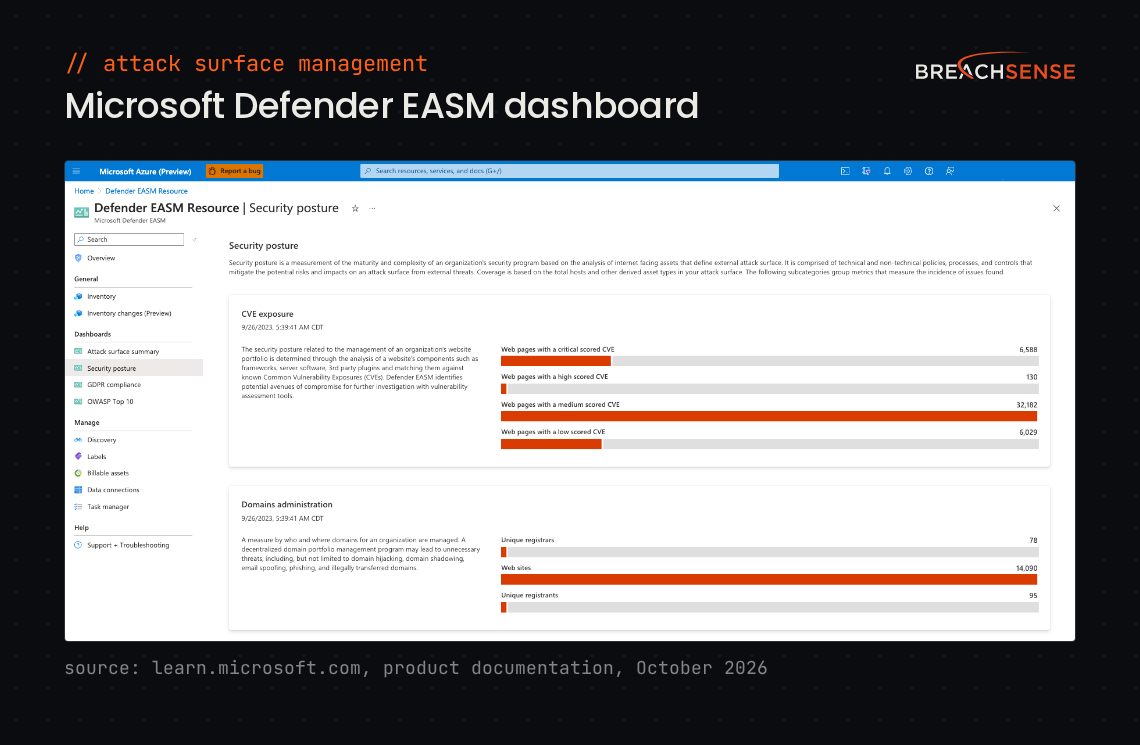
- Page-level scanning. Loads each web page like a visitor would, then flags CVEs (publicly listed vulnerabilities) in the web components it finds.
- Exposure dashboards. Shows CVE exposure and SSL certificate problems. Separate dashboards map findings to the OWASP Top 10 (a list of the most critical web app risks) and to GDPR (the EU’s data protection law).
- Data export. Sends asset data to Log Analytics and Azure Data Explorer, so you can query it in Microsoft Sentinel.
Pricing: $0.011 per billable asset per day. Only assets you approve into your inventory count. Microsoft offers a 30-day free trial.
Rating: 4.3/5 on G2
Pros
- Microsoft’s support team is helpful, especially during setup.
- Flags misconfigurations alongside CVEs.
Cons
- Setup is complex, especially across mixed IT environments.
- Microsoft bills every approved domain, IP address and host-IP pair daily, so large organizations pay more.
- False positives have to be checked by hand.
3. Cortex Xpanse
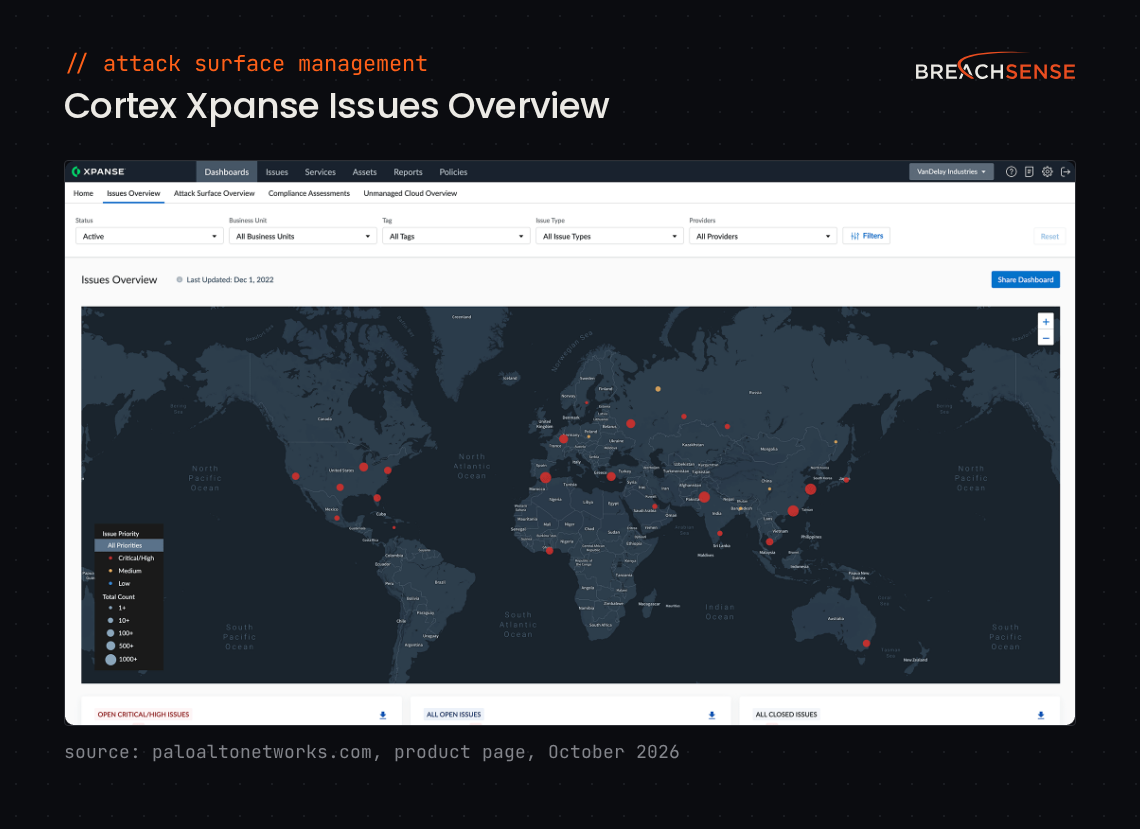
Cortex Xpanse is built for large enterprises with subsidiaries. It starts from Palo Alto Networks’ own scans of the whole internet, not from a list you give it.
Palo Alto’s research team sets up seed terms for your company. Xpanse ties assets to those terms through IP registration records and certificates. Your team then confirms which assets are yours.
Key features
- Policy checks. Checks discovered assets against more than 700 built-in rules for risky exposures.
- Attack Surface Testing (add-on). With your approval, runs safe exploits against your internet-facing assets to confirm a vulnerability is real.
- Active Response (add-on). Fixes some exposures automatically, for example by adding a firewall block rule or isolating an endpoint.
- Third-party monitoring. Palo Alto sells a separate product, Xpanse Link, that monitors your third parties’ attack surfaces.
Pricing: Not published. Palo Alto Networks prices Xpanse by the size of your network, and offers a demo.
Rating: 4.5/5 on Gartner Peer Insights
Pros
- Quick to deploy and configure.
- Opens incident tickets automatically through Cortex XSOAR.
Cons
- Produces more findings than a team can easily work through.
- The interface is complex, especially when you drill into an asset.
- Exporting asset data and building reports are awkward.
4. CrowdStrike Falcon Exposure Management
CrowdStrike Falcon Exposure Management fits CrowdStrike customers who want internet-facing assets in the same console as their endpoints. The external part, CrowdStrike EASM, was called Falcon Surface until CrowdStrike folded it into Falcon Exposure Management. CrowdStrike says Falcon Exposure Management also works with other vendors’ endpoint agents.
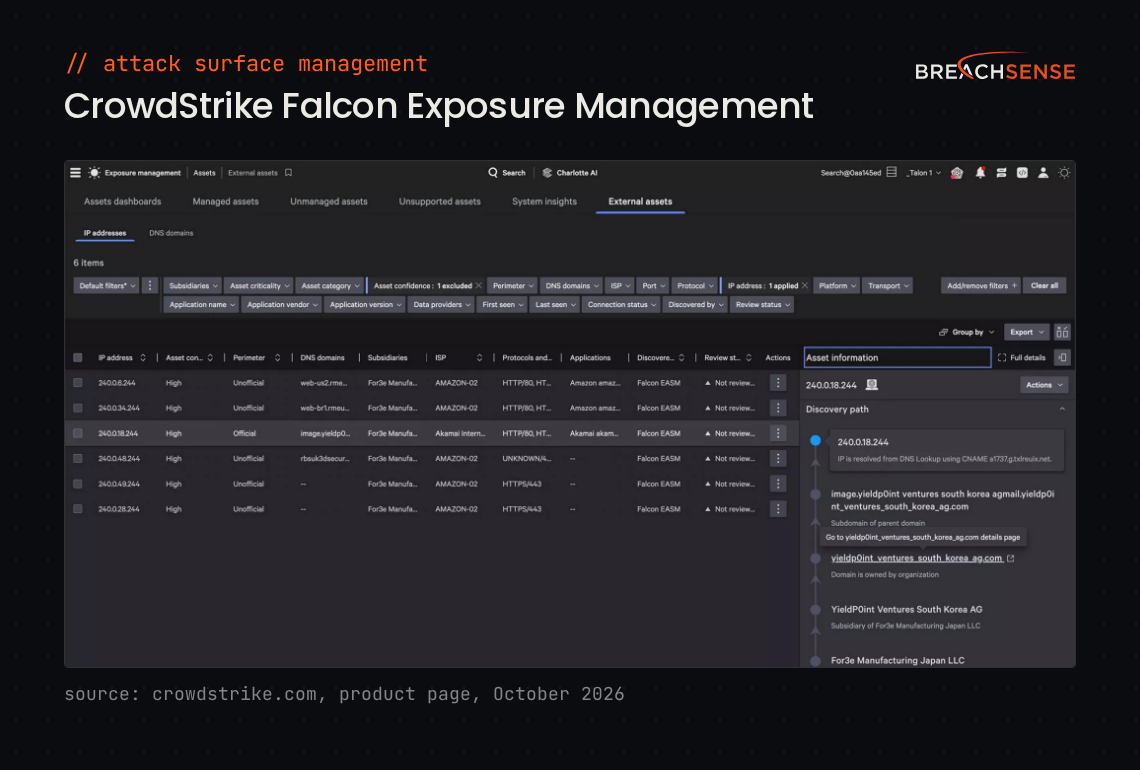
CrowdStrike indexes the whole internet continuously, then lists the external assets that belong to you.
Key features
- Discovery path. Shows how CrowdStrike linked each external asset to your company, for example through a subsidiary.
- Change tracking. Records newly added, modified and removed assets.
- Prioritization. Ranks exposures with CrowdStrike threat intelligence, using an AI agent CrowdStrike calls the Exposure Prioritization Agent.
- Ticketing. Opens tickets in ServiceNow and Jira.
Pricing: Not published. CrowdStrike offers a demo of CrowdStrike EASM.
Rating: 4.5/5 on Gartner Peer Insights
Pros
- Runs in the same Falcon console as CrowdStrike’s other products.
- Finds internet-facing systems your team had lost track of.
- Reports help your team decide which exposures to fix first.
Cons
- Some findings have the wrong severity label, such as a finding marked high that contains a critical vulnerability.
- Dashboards can be slow and are hard to customize.
5. Mandiant Attack Surface Management
Mandiant Attack Surface Management suits teams that want exploit checks built from Mandiant’s incident response work. It’s now part of Google Cloud, alongside Wiz.
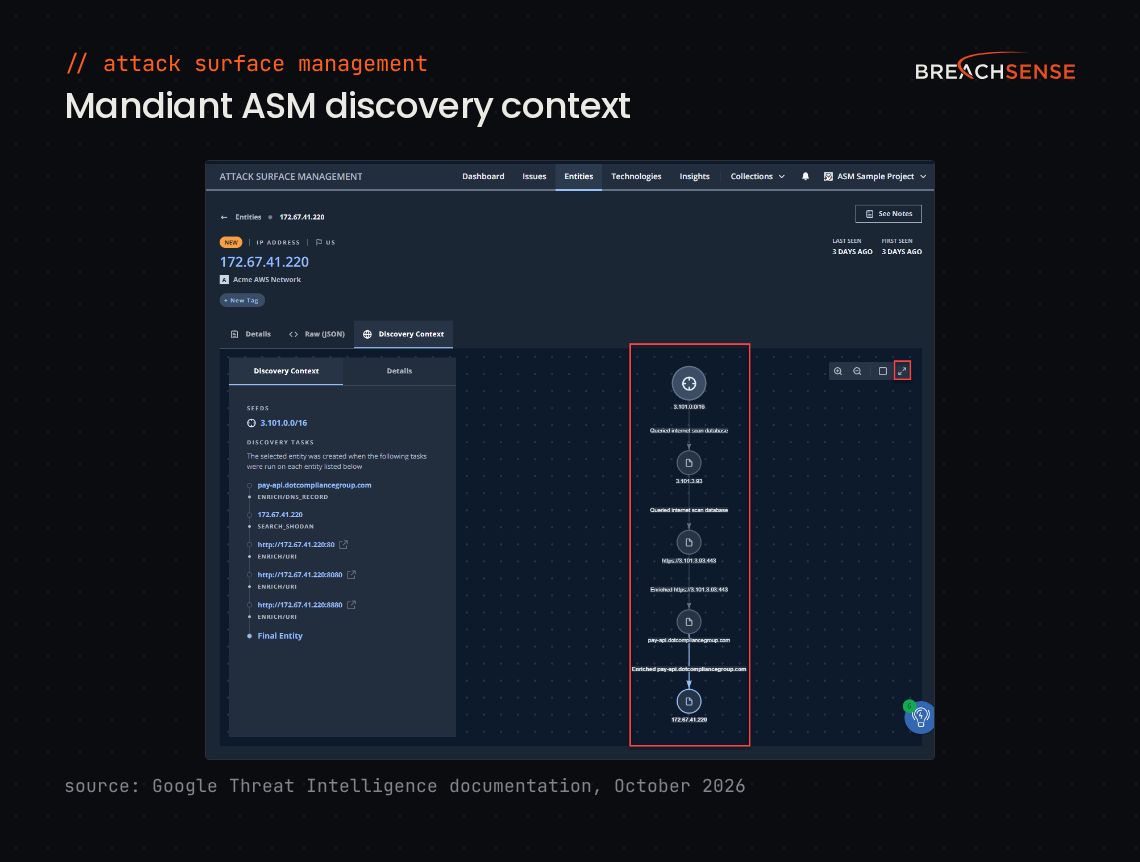
Discovery starts from a domain, IP address or netblock you give Mandiant ASM. You can also connect cloud and DNS provider accounts, such as AWS and Cloudflare.
Key features
- Active checks. Sends safe payloads to confirm whether an asset can be exploited.
- Technology fingerprinting. Identifies over 3,000 technologies on your assets.
- Subsidiary and acquisition assessment. Shows the exposures of each subsidiary separately, and of a company you plan to buy.
- Integrations. Sends findings to Google Security Operations, Cortex XSOAR, Splunk and ServiceNow.
Pricing: Not published. Google prices Mandiant ASM by your company’s employee count, plus a base fee. Google offers trials through its sales team.
Rating: Not enough reviews. G2 lists one review of Mandiant ASM. The pros and cons below come from Gartner Peer Insights reviews of Mandiant Advantage ASM, the product’s earlier name.
Pros
- Findings come with Mandiant threat intelligence.
- Flags assets set up without IT’s approval.
Cons
- You sometimes have to add assets by hand.
- The interface is confusing, especially with large sets of assets.
- Has few export options and few built-in reports.
6. Tenable One Attack Surface Management
Tenable One Attack Surface Management, formerly Tenable.asm, is a good fit for Tenable Vulnerability Management customers. New customers buy Tenable One ASM as part of the Tenable One platform.
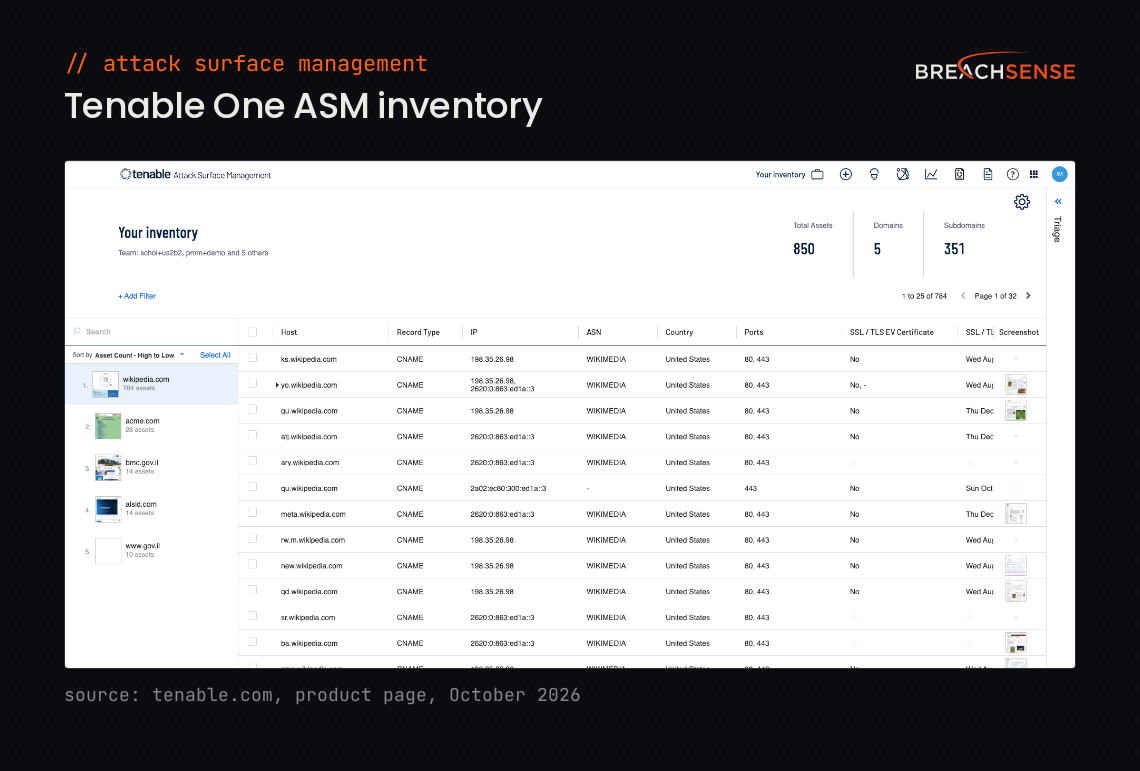
You add your domain, and Tenable suggests related domains from its map of more than 5 billion internet assets.
Key features
- Asset refresh. Refreshes asset data daily or every two weeks, whichever you choose. Tenable alerts you when a new server or port appears.
- Fingerprinting. Identifies CVEs, running services, software versions and login forms on each asset.
- Severity ranking. Ranks each asset on factors such as expired certificates, sensitive open ports and the asset’s highest CVE severity score.
- Vulnerability scans. Starts a Tenable network or web app scan on any asset Tenable One ASM finds.
Pricing: Not published. Tenable offers a demo, but no free trial of Tenable One ASM.
Rating: Not enough reviews. G2 lists one review of Tenable One Attack Surface Management.
Pros and cons: Too few reviews to summarize.
7. Rapid7 Surface Command
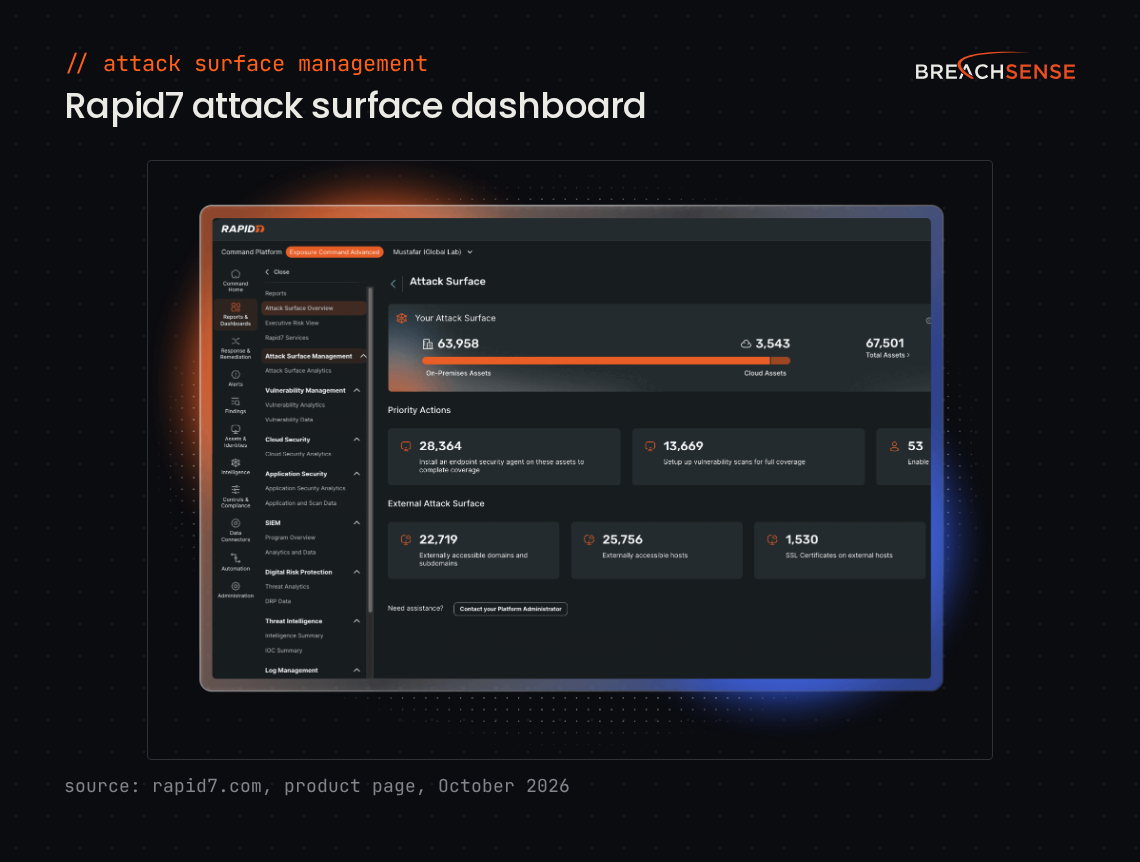
Rapid7 Surface Command puts your internal and external assets in one asset graph. Surface Command discovers external assets from domain and IP seeds you add. Connectors pull in your other assets from your vulnerability scanners and cloud accounts.
Surface Command is the entry tier of Rapid7’s Command Platform. Surface Command shows vulnerability data from your other tools, but doesn’t scan for vulnerabilities itself. Scanning starts at the Exposure Command Essentials tier.
Key features
- External asset view. Shows open ports and SSL certificates for each external asset.
- Asset graph. Links assets to their owners and to each other, so you can see which other assets an internet-facing asset connects to.
- Queries. Lets you search the asset graph with Cypher, a graph query language, or with a visual query builder.
- Known exploited vulnerabilities. Marks each vulnerability that’s on CISA’s Known Exploited Vulnerabilities list, through a built-in connector.
Pricing: Not published. Rapid7 prices Surface Command per billable asset, on an annual subscription. Rapid7 offers a free trial and interactive product tours.
Rating: 4.5/5 on Gartner Peer Insights
Pros
- Finds systems that are missing security agents or other controls.
- Comes with ready-made dashboards.
Cons
- Writing Cypher queries takes time to learn.
- The console can be slow to load data.
- Building your own reports is hard.
8. CyCognito
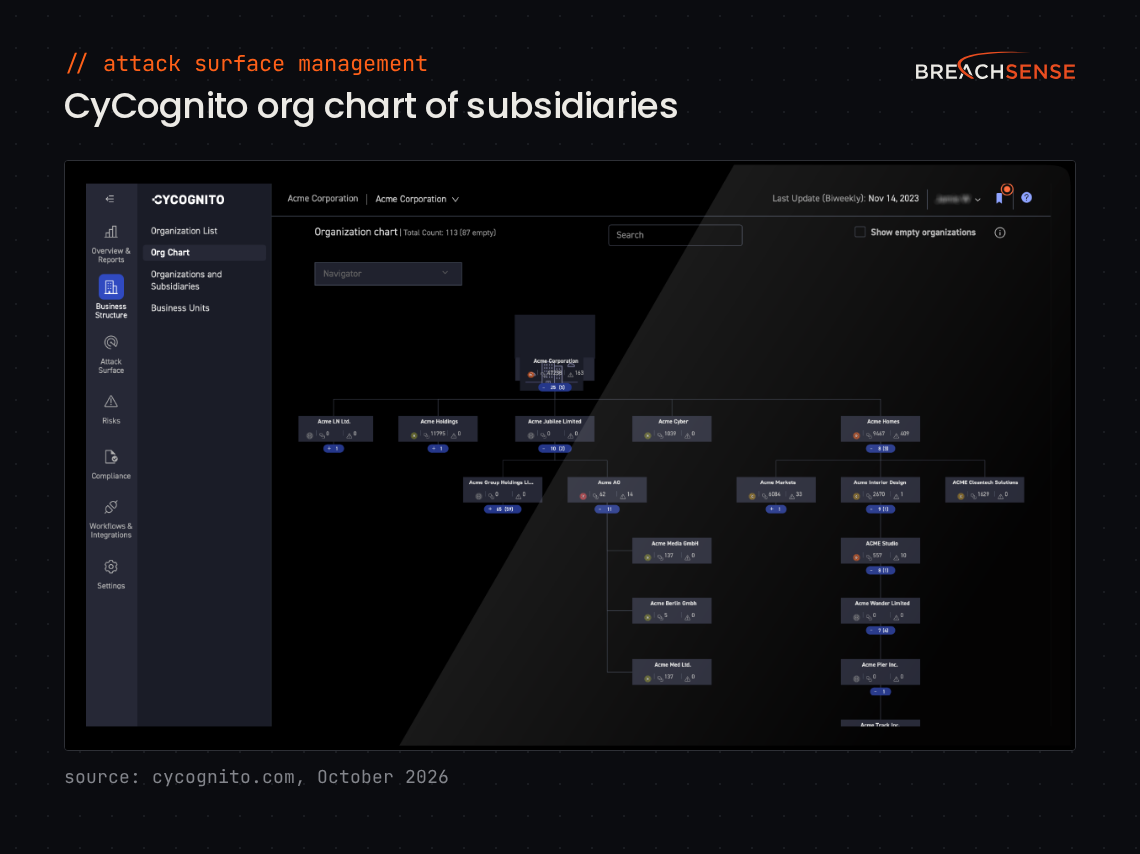
CyCognito is aimed at large enterprises that can’t list every domain their subsidiaries own.
CyCognito starts from your company name alone, with no IP ranges or asset lists. A network of 60,000 CyCognito scanning nodes then finds your assets.
Key features
- Attribution evidence. Shows the evidence that each asset belongs to your company, such as DNS records or TLS certificates.
- Subsidiary mapping. Shows which subsidiary owns an asset, and which third parties connect to it.
- Active testing (sold separately). Runs more than 100,000 security tests across 30 exposure categories. CyCognito says the tests don’t disrupt live traffic.
- Owner routing. Finds each asset’s owner and tracks fixes in tools such as ServiceNow.
Pricing: Not published. CyCognito prices attack surface management by asset volume. CyCognito offers a demo and a free scan of one subsidiary or part of your parent company.
Rating: 4.7/5 on Gartner Peer Insights
Pros
- Reports include remediation steps for each vulnerability.
- Findings are easy to filter, for example by severity, CVE or region.
- The support team flags new CVEs that affect your assets.
Cons
- Scans don’t always update a vulnerability’s status after a fix.
- Searches and retest scans are slow.
- Caps the number of retest scans you can run.
9. Censys Attack Surface Management
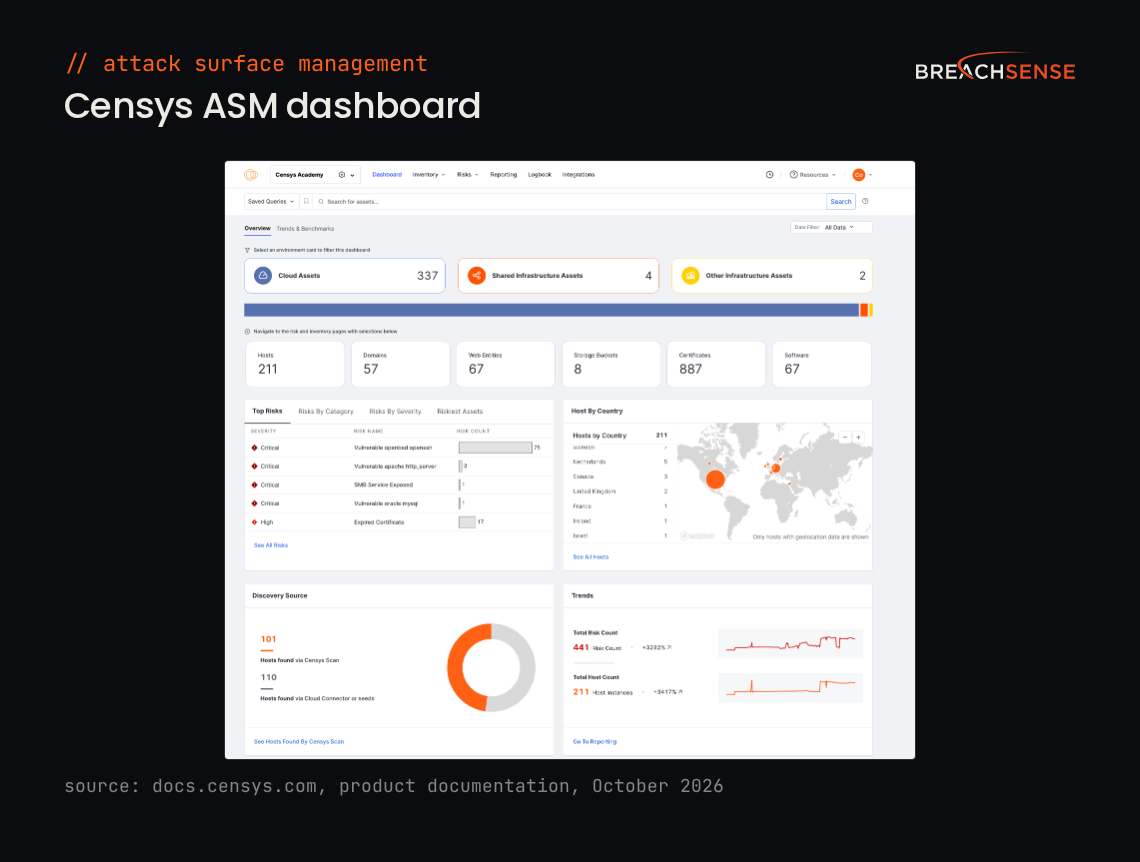
Censys Attack Surface Management suits teams that want every port checked. Its internet-wide scans cover all 65,535 ports, so it catches services on unusual ports, such as SSH moved off port 22.
Censys matches what those scans find to seeds you add, like domains or IP ranges. It can also suggest seeds from your company name. Cloud connectors add your AWS, Google Cloud and Azure assets.
Key features
- Queries. Lets your analysts search your assets in the Censys Search Language.
- CVE detection. Matches CVEs to exact software versions, and raises any vulnerability on CISA’s Known Exploited Vulnerabilities list to critical.
- Risk checks. Flags over 400 risk types, such as invalid TLS certificates and exposed remote access services.
- Rescan. Rescans an asset on demand, so you can confirm a fix worked.
Pricing: Not published.
Rating: 4.4/5 on Gartner Peer Insights
Pros
- SIEM integrations work smoothly.
- Easy to use without deep expertise.
Cons
- Produces false positives, especially for cloud resources that change often.
- Some Censys features need more guidance and practical examples.
- Some API functions have returned errors for long periods of time.
10. Wiz ASM
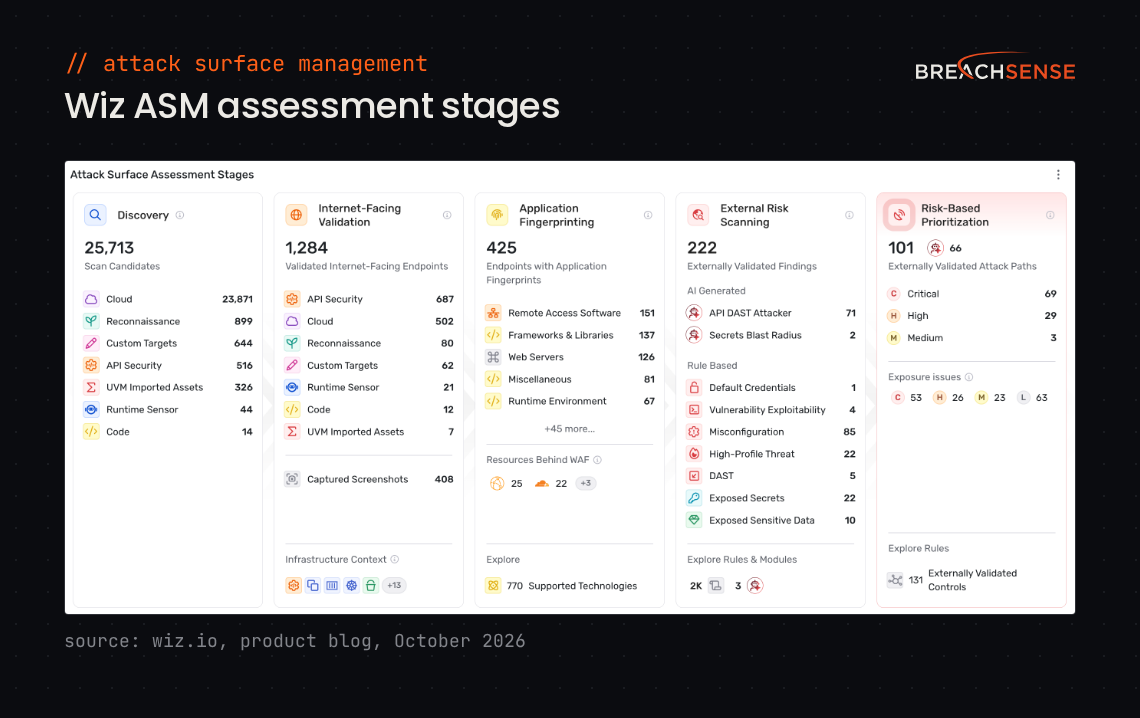
Wiz ASM tests your Wiz-connected cloud from the outside. Wiz, which Google acquired in March 2026, launched Wiz ASM in November 2025 as part of Wiz Exposure Management. Wiz ASM uses your existing Wiz cloud connections to find internet-facing assets, with no extra setup.
You can also add your own assets, such as domains and IP addresses. Adding your own assets lets Wiz ASM cover on-premises systems.
Key features
- Exploitability tests. Tests for known CVEs, default credentials and misconfigurations.
- Secret detection. Checks responses from internet-facing apps for secrets, such as API keys.
- Cloud context. Ranks each exposure by whether the exposure leads to an attack path inside your cloud.
- Owner identification. Names the team, or the developer, responsible for fixing an exposure.
Pricing: Not published.
Rating: Not enough reviews. G2’s Wiz reviews cover the whole Wiz platform.
Pros and cons: Too few reviews to summarize.
11. Qualys CyberSecurity Asset Management
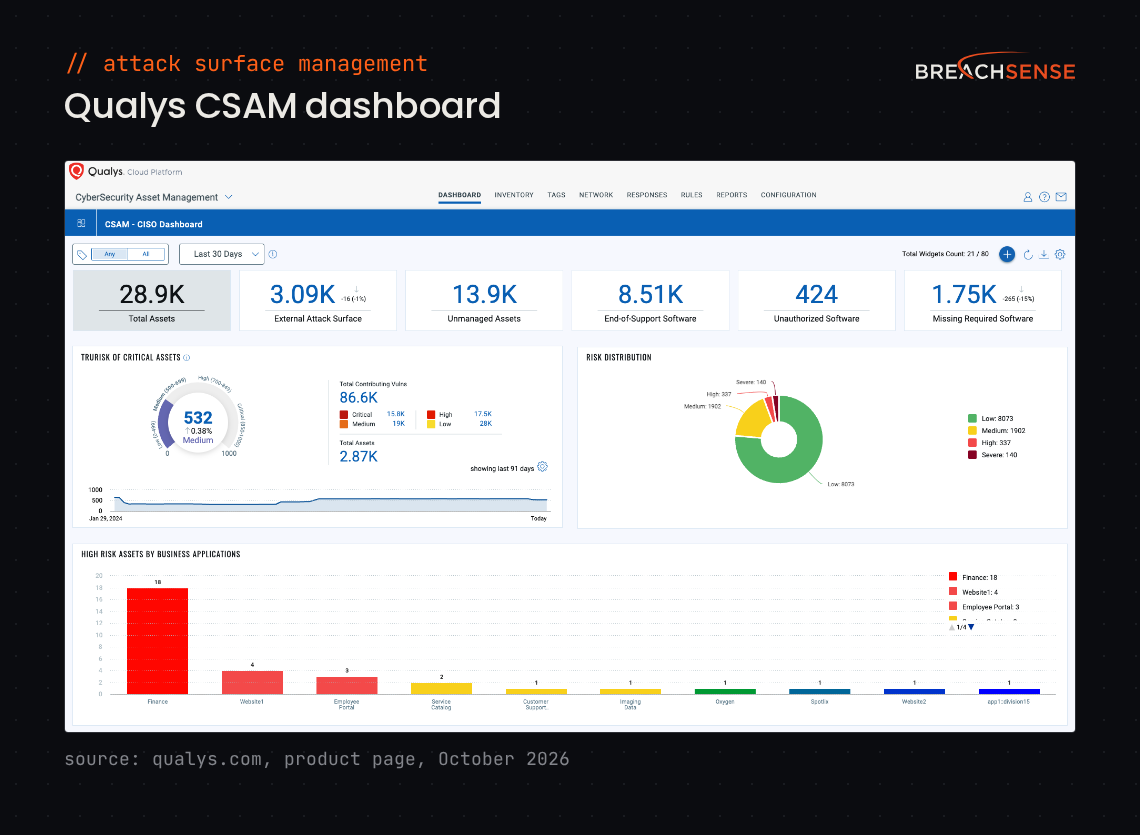
Qualys CyberSecurity Asset Management (CSAM) fits teams already on Qualys VMDR, the Qualys vulnerability management product. CSAM can add the assets it finds to your Qualys vulnerability scans. EASM comes as part of CSAM.
Discovery starts from seeds, such as your company name or domains. Qualys expands the seeds with DNS data and Shodan. Qualys can then run its own active scans.
Key features
- Attribution score. Gives each discovered asset a confidence score that the asset belongs to your company.
- Active scans. Detects operating systems, open ports and vulnerabilities with Qualys external scanners.
- Typosquatted domains. Finds domains registered with a misspelling of yours, if you turn the option on.
- CMDB sync. Keeps your configuration management database (CMDB) in ServiceNow or BMC up to date.
Pricing: Not published. Qualys offers a 30-day free trial of CSAM with EASM.
Rating: 4.4/5 on Gartner Peer Insights
Pros
- Shows each asset’s vulnerabilities next to its inventory details.
- Ranks vulnerabilities by risk, with links to remediation steps.
Cons
- Slow, especially when you switch between modules.
- Detection accuracy is mixed, with some false positives and some missed vulnerabilities.
- The interface differs from one module to the next.
12. Intruder
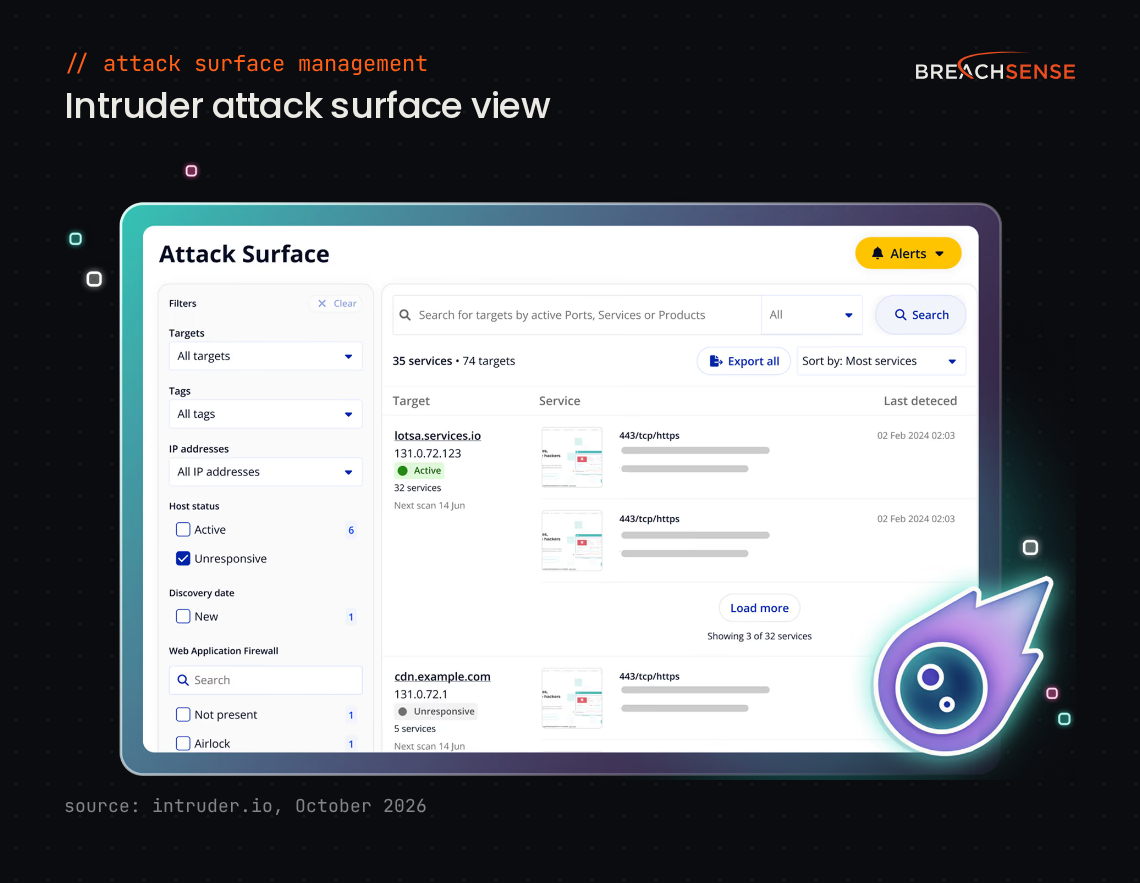
Intruder is a vulnerability scanner with attack surface monitoring, built for small security and IT teams. You add your targets and domains, and connect AWS, Google Cloud, Azure or Cloudflare accounts. Intruder checks those cloud accounts for new IP addresses and hostnames every 2 hours, then adds what’s new to your scans.
Related domain discovery, which finds other domains your company owns, is an Enterprise plan feature.
Key features
- Vulnerability scanning. Scans servers and websites with the Tenable scanner on Pro and Enterprise plans, and with open-source scanners on lower plans.
- Emerging threat scans. Checks your targets for new critical vulnerabilities within hours of the vulnerabilities going public.
- Port monitoring. Monitors more ports on higher plans, from the top 10 ports on Cloud to all ports on Enterprise.
- Exposure checks. Flags exposed admin panels and public databases.
Pricing: The Cloud plan costs $299 a month for 5 infrastructure targets, or $239 a month billed annually. The Pro plan costs $499 a month, and Enterprise pricing is custom. Intruder offers a free plan and a 14-day free trial.
Rating: 4.8/5 on G2
Pros
- Setting up authenticated web app scans is easy.
- Reports are clear enough to share with auditors and customers.
- Few false positives.
Cons
- Remediation advice doesn’t always include step-by-step fixes.
- Priced higher than competing scanners.
- Scans are slow.
13. Detectify
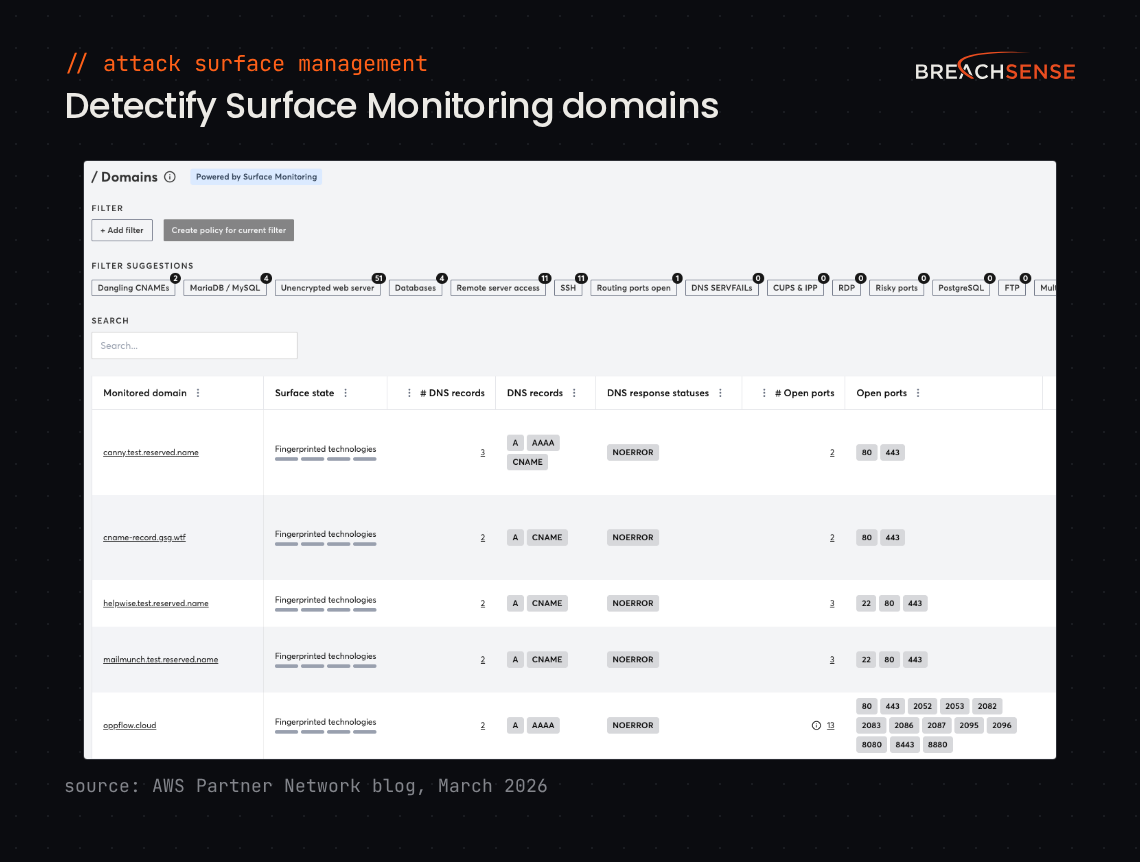
Detectify focuses on web applications. Surface Monitoring finds your subdomains from a domain you add, then tests the subdomains for vulnerabilities and misconfigurations. Application Scanning tests apps you choose more deeply, including pages behind a login.
More than 400 ethical hackers send Detectify new vulnerability tests. Detectify builds each accepted test into its scanner.
Key features
- Payload-based CVE tests. Sends test payloads to confirm a vulnerability.
- Subdomain takeover monitoring. Alerts when a subdomain hosted on a cloud provider, such as AWS or Azure, could be taken over.
- Secret detection. Finds API keys and passwords left exposed in your apps.
- Custom policies. Lets you choose which changes to your attack surface trigger an alert.
Pricing: Detectify’s annual platform fee starts at €0 on Starter, €2,500 on Standard, €5,000 on Professional and €15,000 on Enterprise. Surface Monitoring costs extra per domain, and Detectify doesn’t publish that fee. Discovery of your other root domains starts on the €5,000 Professional plan. Detectify offers a 2-week free trial.
Rating: 4.5/5 on G2
Pros
- Reports are quick to build and useful for compliance audits.
- Runs scans on a schedule and emails you the reports.
- Setting up scans of pages behind a login is easy.
Cons
- Pricing is complicated and gets expensive when you monitor many domains.
- Findings don’t always explain why an issue is a vulnerability.
- Remediation documentation can be hard to follow.
Selection criteria
How we evaluated the vendors
Features and prices come from each vendor’s own site. We compared the tools on these five points:
- How discovery starts. Whether the tool starts from domains you add, your company name, your cloud accounts or the vendor’s own internet-wide scans.
- What the tool checks on each asset. Whether the tool tests for known vulnerabilities or runs safe exploit tests, or only lists open ports and certificates.
- Sold alone or inside a platform. Whether you can buy the ASM tool on its own, and which of your other tools it sends findings to.
- Published pricing. Whether the vendor’s site lists a price.
- Leaked credentials. Breachsense is the only tool here that returns employee credentials stolen by infostealer malware for your domains. Wiz ASM and Detectify find secrets exposed in your own apps.
We checked every tool’s rating and each competitor’s reviews in October 2026, on the review site named in each entry.
How to choose
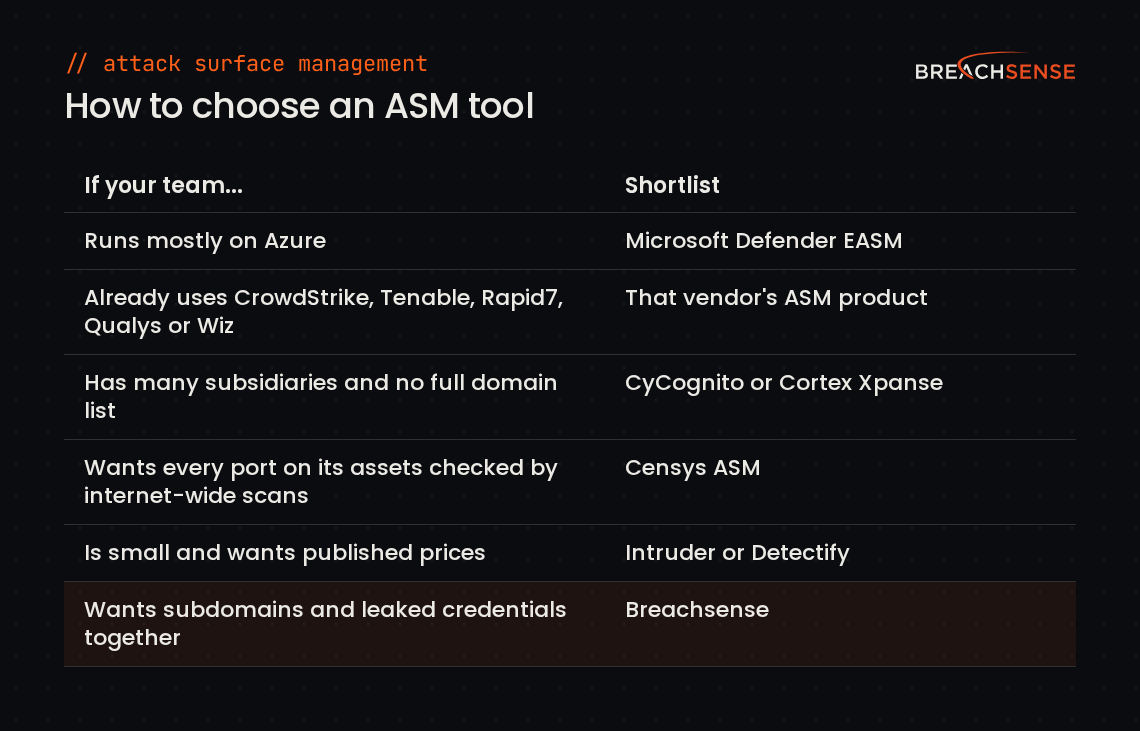
Before your first demo, make a list of your domains, IP ranges and cloud accounts you know you own. Compare each tool’s results against that list to see what the tool found beyond it. Make a plan for who fixes each kind of asset beforehand. Your shadow IT policy should name who decides whether a server no team owns gets an owner or gets shut down.
If you pick an ASM tool other than Breachsense, add compromised credential monitoring to see which employee passwords have leaked. Our list of the best dark web monitoring tools compares ten tools that find leaked credentials and company data.
Choosing an attack surface management tool for your security stack
Shortlist the ASM tools that already plug into your security infrastructure. If you can’t list every domain your company owns, pick a tool that starts discovery from your company name. To check which employee passwords have already leaked, run a free dark web scan. Then book a demo to see how Breachsense maps your subdomains, or a client’s, and how dark web monitoring alerts you when we find an employee’s password.